
How to Update to Windows 11 23H2 On Unsupported Hardware.
This tutorial provides detailed instructions on upgrading from Windows 11 22H2 to Windows 11 23H2 on a computer that does not meet the minimum hardware requirements for Windows 11.
Previously, upgrading a desktop or laptop with unsupported hardware to the latest version of Windows 11 required a complex process, as described in this guide. However, you can now upgrade your system from Windows 11 version 22H2 to 23H2 more easily by following the steps below.
How to Easily Update to Windows 11 23H2 on Unsupported Hardware
According to Microsoft, Windows 11 versions 22H2 and 23H2 are built on a common operating system with identical system files. Consequently, all the new features of Windows 11 version 23H2 are already included in Windows 11 version 22H2 after installing the latest monthly quality update, but they remain inactive.
These new features will be automatically enabled through the "enablement package" KB5027397, which is downloaded and installed automatically from Windows Update on systems with supported hardware for Windows 11.
To upgrade to Windows 11 23H2 and activate all its new features, you can manually download and install the Windows 11 23H2 enablement package (KB5027397).
Note: If you cannot update your PC to Windows 11 23H2 using the steps below, refer to this article: How To Update To Windows 11 22H2 On Unsupported Hardware.
Step 1. Install KB5031455 Update
- Download the 2023-10 Cumulative Update Preview for Windows 11 Version 22H2 for x64-based Systems (KB5031455) from the Microsoft Update Catalog.
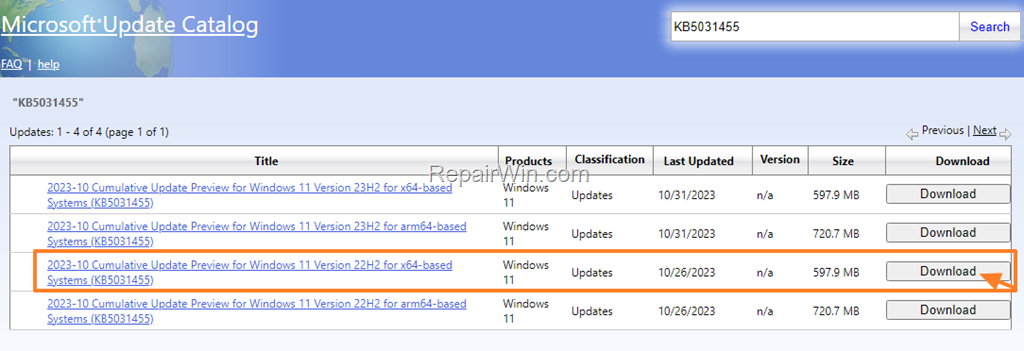
2. In the window that opens, click to download the ".msu" file.
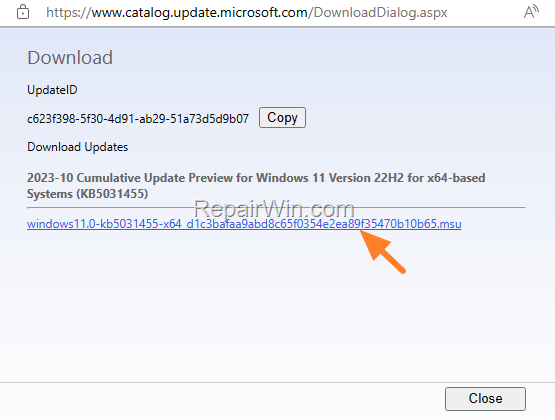
3. Once the download is complete, double-click on the downloaded file to install the update. This step ensures your system is prepared with the latest updates, which are prerequisites for the enablement package.
Note: If you receive the error message "This update is not applicable on your computer", proceed to Step 2.
4. After installation, restart your PC and continue to Step 2.
Step 2. Install Enablement Package for Windows 11 23H2
1. Click the link below to download the Windows 11 23H2 enablement package KB5027397:
Note: For ARM64-based systems, download this package:
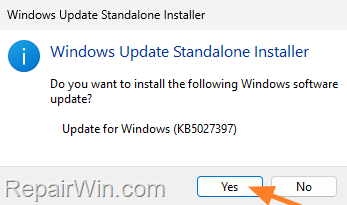
2. Once the download is complete, double-click on the downloaded file and click Yes to install the KB5027397 Update. This step activates the dormant features of Windows 11 23H2, transforming the system into the latest version.
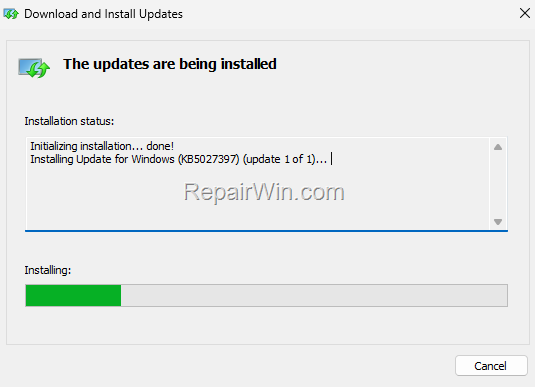
3. Allow the installation to complete, and when it’s done, click Restart now. This reboot finalizes the upgrade process, ensuring all new features are fully integrated and operational.
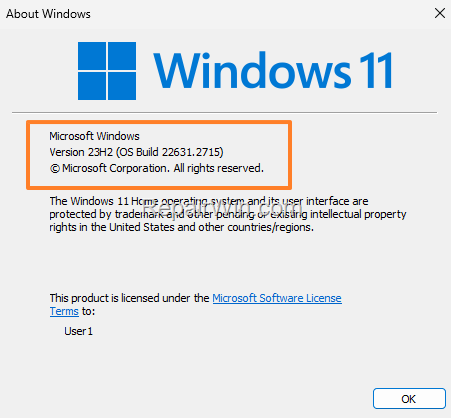
4. That's it! After your system reboots, you will be on Windows 11 version 23H2.
Summary
Upgrading to Windows 11 23H2 on unsupported hardware involves downloading and installing specific updates and enablement packages. By following the steps outlined, you can activate the latest features of Windows 11 23H2 on your system. Always ensure your data is backed up before proceeding with these methods.
That's all folks! Please leave a comment in the comment section below or even better: like and share this blog post on social networks to help spread the word about this solution.
Frequently Asked Questions
What are the steps to upgrade to Windows 11 23H2 on unsupported hardware?
To upgrade to Windows 11 23H2 on unsupported hardware, first install the KB5031455 update by downloading it from the Microsoft Update Catalog and executing the downloaded file. After installation, restart your PC. Next, download the Windows 11 23H2 enablement package (KB5027397) for x64 or arm64 systems from the provided links, install it, and restart your PC to complete the upgrade.
Why might I receive an error message stating the update is not applicable on my computer?
You might receive the error message 'This update is not applicable on your computer' if the update you're trying to install doesn't match your system's configuration. If this occurs, proceed to Step 2, which involves downloading the Windows 11 23H2 enablement package directly.
What is the purpose of the KB5027397 enablement package?
The KB5027397 enablement package is designed to activate the dormant features of Windows 11 version 23H2 that are already included in Windows 11 version 22H2 systems after the last monthly quality update. By installing this package, you're upgrading your Windows 11 to the 23H2 version.
Can I upgrade to Windows 11 23H2 using the Windows Update feature?
If your hardware is supported for Windows 11, the new features of version 23H2 will be automatically enabled through the 'enablement package' KB5027397, which gets installed via Windows Update. However, for unsupported hardware, you'll need to follow the manual download and installation process described above.



