How to Find your Google Contacts in New GMAIL.
Recently GMAIL changed its appearance and many people wondering where the Contacts shortcut have gone, in order to view and manage their Google Contacts. In this tutorial you 'll learn where to find Contacts in new Gmail & how to Import, Export or Print Google contacts.
How to Manage your Google Contacts.
To view and manage your Google Contacts login with your account to Gmail
1. Click at Google Apps menu at the top right.
2. Click the Contacts app. *
* Note: If you don't see the Contacts app then click More at the bottom of this window or to navigate to: https://contacts.google.com

To Import, Export or Print Contacts in New Gmail:
1. Open the Contacts app as descripted above.
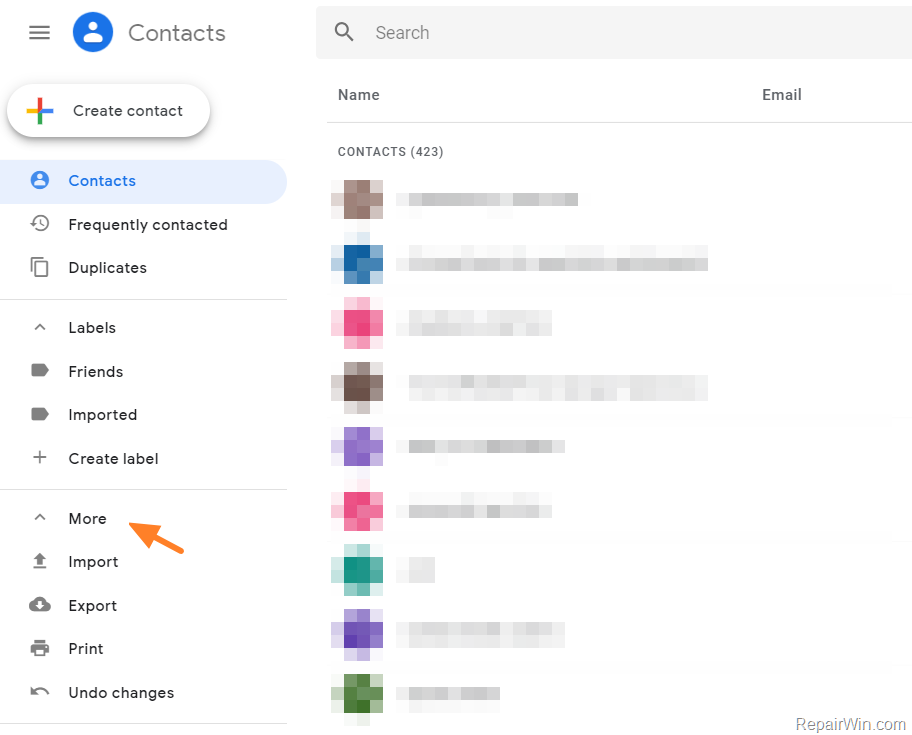
2. At the left pane, click More to view the Import, Export & Print options.
That’s all folks! Did it work for you?
Please leave a comment in the comment section below or even better: like and share this blog post in the social networks to help spread the word about this solution.
Frequently Asked Questions
Where can I find the Google Contacts shortcut in the new Gmail interface?
In the new Gmail interface, you can find the Google Contacts shortcut by clicking on the Google Apps menu at the top right and selecting the Contacts app. If it's not visible, click 'More' at the bottom of the window or go directly to https://contacts.google.com.
How do I import, export, or print my Google Contacts in the new Gmail?
To import, export, or print your Google Contacts in the new Gmail, first open the Contacts app as described. Then, in the left pane, click 'More' to access the Import, Export, and Print options.
What should I do if the Contacts app is not visible in my Gmail?
If the Contacts app is not visible in your Gmail, click 'More' at the bottom of the Google Apps menu to locate it. Alternatively, you can navigate directly to https://contacts.google.com to access your contacts.