
How to Download Realtek Audio Manager & Realtek Audio Drivers (Windows 10/8.1/7/Vista).
The 'Realtek HD Audio Manager' is an easy tool to control the sound and to tweak several audio settings on Windows 10, 8 or 7 desktops or laptops, when a Realtek Sound card device is installed on the system. The Realtek High Definition Audio Manager application is installed when you install the Realtek HD audio driver from the support site of your motherboard, (or your PC) manufacturer, or from the official Realtek support site.

But in many computers, especially in Windows 10 based PC's or Laptops, the Realtek Audio Manager, is missing from the taskbar. This is happened because, in Windows 10 OS, the Realtek sound driver is downloaded and installed automatically from Microsoft Update and this driver package contains only the basic drivers for your sound card and does not contain the Realtek HD Audio Manager application.
This tutorial contains detailed instructions on how to download and install the Realtek HD Audio drivers & the Realtek HD Audio Manager in Windows 10, 8, 7 & Vista OS.
How to Download & Install the Realtek HD Audio Manager on Windows 10/8/7 OS.
If you want to install the Realtek Audio Manager on your Windows 10 PC, then proceed and try to find (and download) the Realtek HD Audio drivers from your PC/Laptop/Motherboard manufacturer support site. If you cannot find the Realtek Audio Drivers from the manufacturer, then you have the following options:
- Option 1. Download the Realtek HD Audio Driver v2.81 with the Realtek Audio Manager.
- Option 2. Download the Latest Realtek HD Audio Driver v2.82 without the Realtek Audio Manager.
Option 1. How to Install the Realtek HD Audio Driver v2.81 with the Realtek Audio Manager.
If you want to install both the Realtek Audio Driver and the Realtek Audio Manager, then you have to download and install the version 2.81 of the Realtek High Definition Audio Drivers, because the 2.82 version, does not contain the Audio Manager application. So…
1. Navigate to the below link* and then click the Download driver button.
* Note: Unfortunately, the official Realtek support site does not offer anymore the 2.81 version of the Realtek Audio drivers to download.
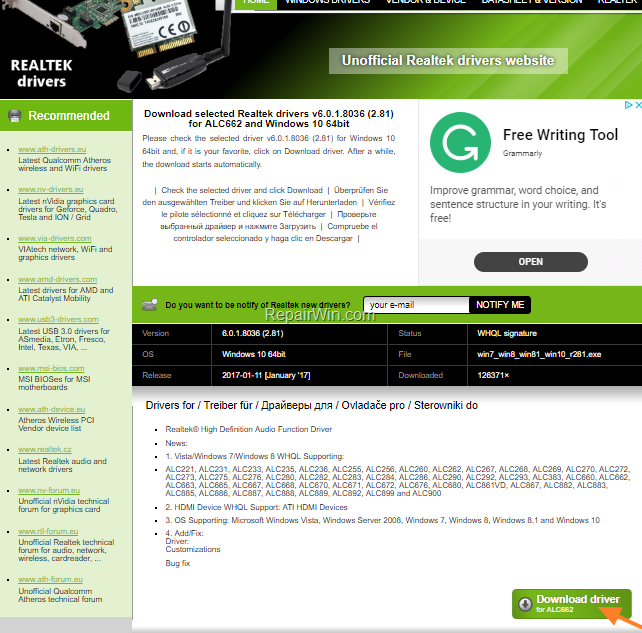
2. When the download is completed, double click at the executable file (win7_win8_win81_win10_r281.exe) and proceed to install the Realtek Audio driver and the Realtek Audio Manager on your Windows 10/8/7 PC.
Option 2. How to Install the Latest Realtek HD Audio Driver v2.82 only (Without the Realtek Audio Manager).
If you want to install only the latest Realtek Audio drivers (v2.82), use the instructions below:
1.. Navigate to Realtek HD Audio Driver Download webpage.
2. Click the download button  next to the version of the driver you want to download {e.g. "64bits Vista, Windows7, Windows8, Windows8.1, Windows10 Driver only (Executable file)"}

3. At the next screen, check the "I Accept to the above" box, type your email address and then click Download this file.
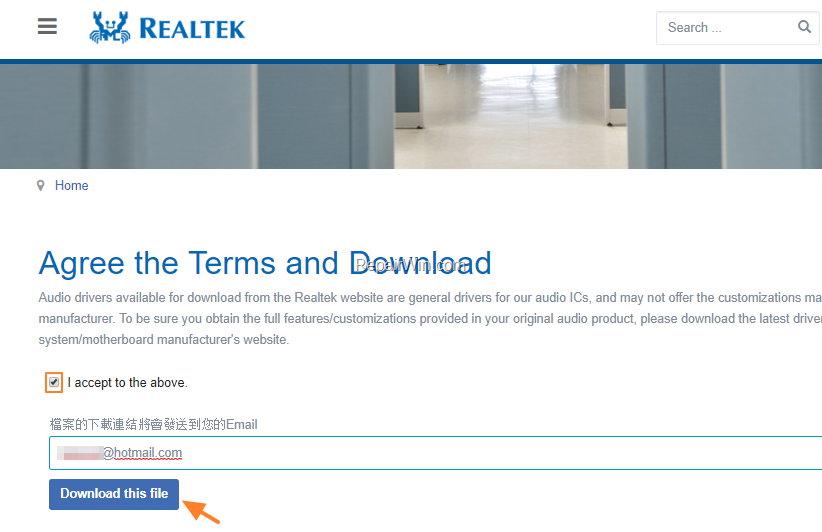
4. Now you should informed that the download link has sent to your email..

3. Now navigate to your emails and open the email you received from Realtek (noreply@realtek.com) and then click the Link to download the Realtek Audio driver file.

4. Finally type the characters you see in the Captcha picture and click the Go button to download the Realtek HD Audio Driver.
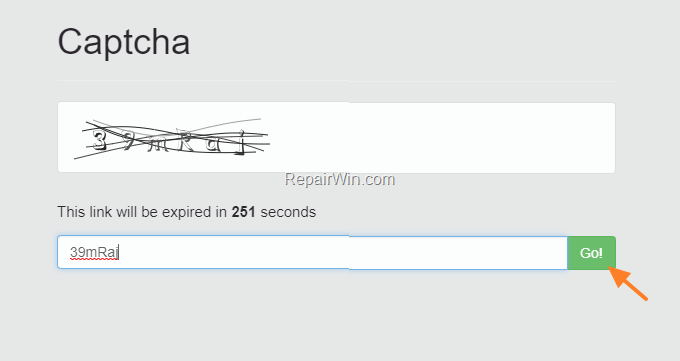
2. When the download is completed, double click at the download file to install the latest version of Realtek audio drivers on your PC.
That’s all folks! Did it work for you?
Please leave a comment in the comment section below or even better: like and share this blog post in the social networks to help spread the word about this problem.
Frequently Asked Questions
What is Realtek HD Audio Manager?
Realtek HD Audio Manager is a tool that allows users to control sound settings and tweak audio features on Windows 10, 8, or 7 machines equipped with Realtek sound card devices.
Why is Realtek HD Audio Manager missing in Windows 10?
In many Windows 10 PCs or laptops, Realtek HD Audio Manager is missing because the Realtek sound driver is automatically downloaded and installed from Microsoft Update, which includes only basic drivers, not the full Audio Manager application.
How can I install Realtek HD Audio Manager on Windows 10?
To install Realtek HD Audio Manager, try downloading the Realtek HD audio drivers from your PC, laptop, or motherboard manufacturer's support site. If unavailable, you can download and install Realtek HD Audio Driver v2.81 which includes the Audio Manager, or opt for v2.82 for just the driver without the manager.
Can I still download Realtek HD Audio Driver v2.81?
Unfortunately, the official Realtek support site no longer offers version 2.81 of the Realtek Audio drivers, but you may find it through other sources or archives that offer this specific version.



