How to Disable Incognito Mode in Chrome Browser.
Incognito mode allows users to browse the internet without saving their browsing history, cookies, or site data locally. While this feature is beneficial for privacy, it can pose challenges for parents managing children's internet access, or educators overseeing shared devices. Disabling it ensures all browsing activity remains visible and accountable.
Here's how to permanently disable incognito mode on Windows, macOS, and Android devices.
How to Disable Chrome Incognito Mode in Windows
This method modifies the Windows Registry to block incognito mode system-wide for Chrome.
1. In the search bar, type "cmd" or "command prompt" and then select Run as administrator.
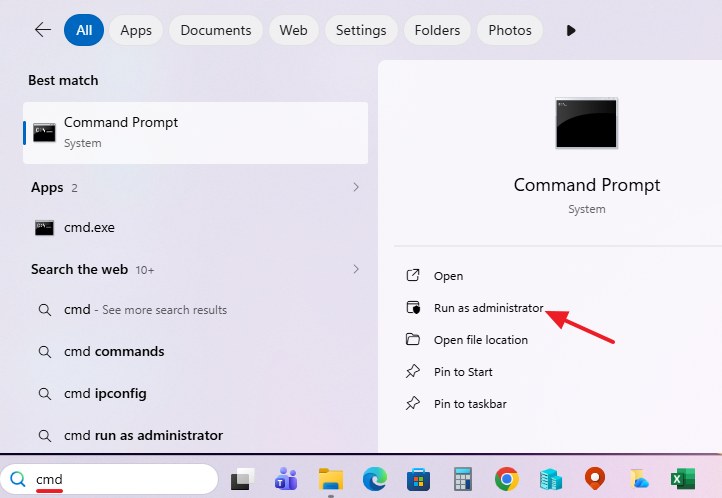
2. In the admin command prompt, issue this command and press Enter:
reg add "HKLM\SOFTWARE\Policies\Google\Chrome" /v IncognitoModeAvailability /t REG_DWORD /d 1 /f
This command creates a new registry key under the Chrome policies that sets the IncognitoModeAvailability value to 1. This effectively disables the incognito mode by instructing Chrome to ignore any attempts to open an incognito window.

3. Restart Chrome, and the Incognito option will be grayed out. Additionally, the keyboard shortcut "Ctrl + Shift + N" for opening a new Incognito window will no longer work.
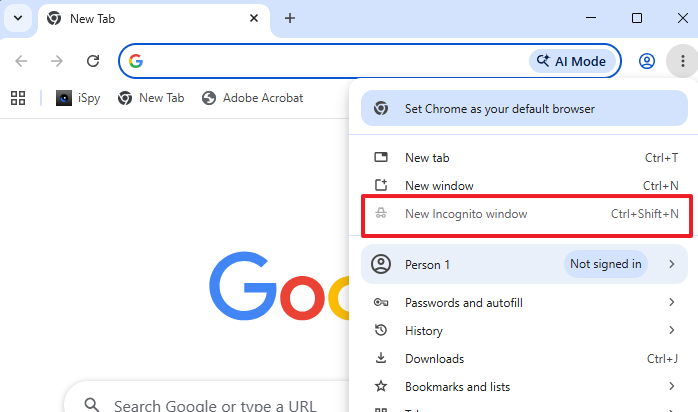
To undo the change and re-enable incognito mode, issue the below command in Command Prompt (Admin):
-
reg delete "HKLM\SOFTWARE\Policies\Google\Chrome" /v IncognitoModeAvailability /f
How to Disable Chrome Incognito Mode in macOS
On Mac, you'll use a Terminal command to set a system preference that Chrome respects.
1. Open Terminal (find it in Applications > Utilities > Terminal).
2. Run the below command to disable incognito mode in Chrome:
defaults write com.google.Chrome IncognitoModeAvailability -integer 1
This command modifies the Chrome application preferences stored in the macOS system, setting the IncognitoModeAvailability to 1, which disables the incognito mode.
3. Close Terminal.
4. Quit Chrome completely (Cmd + Q) and relaunch it. Incognito Mode will be disabled, and the Cmd + Shift + N shortcut will no longer open a new Incognito window.
To re-enable incognito mode later, run in Terminal:
defaults delete com.google.Chrome IncognitoModeAvailability
How to Disable Chrome Incognito Mode on Android
Unlike a computer, Android doesn't have a hidden menu or settings to turn off Chrome's incognito mode. Instead, you have two reliable options: use a dedicated app from the Google Play Store, or set up Google's Family Link app if you're managing a child's device.
- Download the Google Family Link app on your own phone and set up a supervisor account. Family Link allows parents to manage their children's device usage and app access.
- Link your child's Google account and Android device to your Family Link group.
- Open the Family Link app, select your child’s profile, and go to Controls > Content restrictions > Google Chrome.
- Change the setting from Allow all sites to either Try to block explicit sites or Only allow approved sites. Both settings restricts the use of incognito mode in Chrome.
Summary
Disabling incognito mode in web browsers can be achieved through various methods depending on the operating system. Windows users can modify the Registry, while macOS users can utilize Terminal commands. On Android, parental control apps provide the necessary tools to restrict private browsing. Employing these methods ensures better control over internet usage for parental or professional purposes.