
Install Telnet Client on Windows 10/11 (How to)
If you want to use Telnet in Windows 10/11, continue reading below to learn how to install it.
Telnet is an network protocol used on the Internet or local area network to provide a bidirectional communication between machines. On Windows, Mac and Unix systems, "telnet" is a command-line client utility that uses the Telnet protocol to remotely connect to other machines (usually servers) and perform various tasks on them. (e.g to add/remove users, to edit server's files and configuration, etc..)
In Windows 11/10/8/7 OS the Telnet client is included, but for security reasons is disabled by default, because Telnet is not a secure protocol. (Telnet is unencrypted and anyone who monitors the user's connection can see anything typed in Telnet session in plaintext).
How to Enable Telnet Client in Windows 11/10.
Method 1. Install Telnet client using a command.
1. Press simultaneously the Windows  + R keys to open the run command box.
2. Type pkgmgr /iu:"TelnetClient" and hit Enter.

Method 2. Enable Telnet Client from Windows features.
1. Press simultaneously the Windows + R keys to open the run command box.
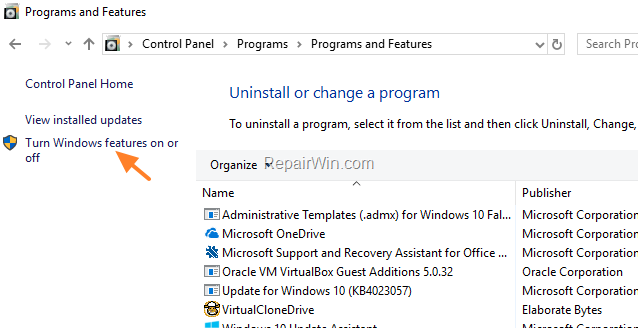
2. Type control appwiz.cpl to open Programs and features in Control panel.

3. Click Turn Windows features on or off.
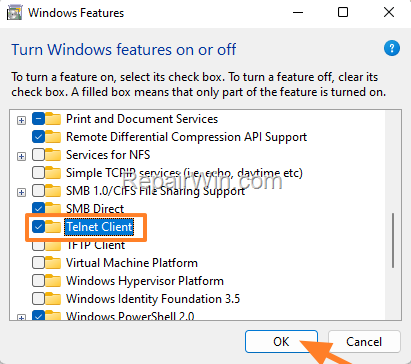
4. Check the Telnet Client and hit OK. *
* Note: If you watt to remove Telnet Client after finishing your job, just uncheck 'Telnet Client' in Windows features and click OK.
Method 3. Install Telnet Client with DISM.
1 Open PowerShell as Administrator. To do that:
-
- Click the Start menu and type powershell in the search box
- Click Run as administrator.

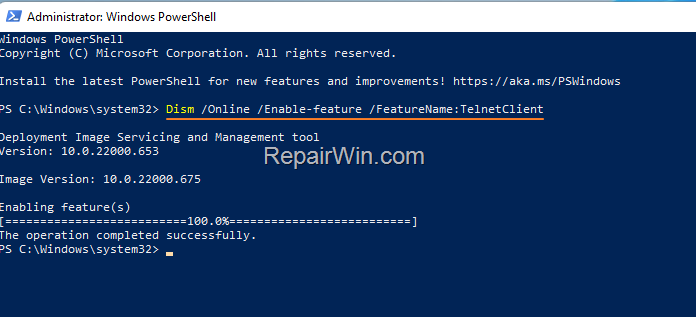
2. In Windows PowerShell give the following DISM command to install the telnet client in Windows 10/11:
- Dism /Online /Enable-feature /FeatureName:TelnetClient
That's all folks! Did it work for you?
Please leave a comment in the comment section below or even better: like and share this blog post in the social networks to help spread the word about this problem.
Frequently Asked Questions
What is Telnet used for?
Telnet is a network protocol used for bidirectional communication between machines over the Internet or local area networks. It allows you to remotely connect to other machines and perform tasks such as adding/removing users or editing server files and configurations.
Is Telnet enabled by default on Windows 10/11?
No, Telnet is disabled by default in Windows 10/11 for security reasons because it is an unencrypted protocol that exposes data to anyone monitoring the connection.
How can I enable Telnet Client on Windows 10/11 using a command?
You can install Telnet Client by pressing Windows + R to open the run command box, typing pkgmgr /iu:"TelnetClient", and hitting Enter.
Can I remove Telnet Client after enabling it in Windows?
Yes, you can remove the Telnet Client by going to Windows features, unchecking 'Telnet Client', and clicking OK.



