
FIX: You Don't currently have permission to access this folder on External USB Drive (Solved)
This tutorial contains detailed instructions to resolve the following problem, when trying to access an external USB disk on an HP laptop with Windows 10: "You don't currently have permission to access this folder. Click continue to permanently get access to this folder". The error persists, even after pressing the 'Continue' button to get access to the drive.

The strange error "You don't have permission to access this folder" is appeared on a brand new HP ProBook 450 G5 laptop, when the user tries to view the contents of a connected USB disk (Pen drive, USB Drive, etc.).
After investigating the problem, I discovered that is problem is caused from the security permissions that have applied on the HP Client Security Manager program. HP Client Security Manager, is program developed from Hewlett-Packard and allows you to protect your data, device, and identity by increasing the security of your computer.
How to fix: No Permission to access USB Drive on HP Laptop (Windows 10/8/7).
1. Open HP Client Security manager.

2. Then click on Device Security.

3. At Administrators tab, set the 'Removal storage' security to Allow – Full Access and click Submit.

4. Additionally (if you want), give Full Access to the removable storage media to Standard Users.
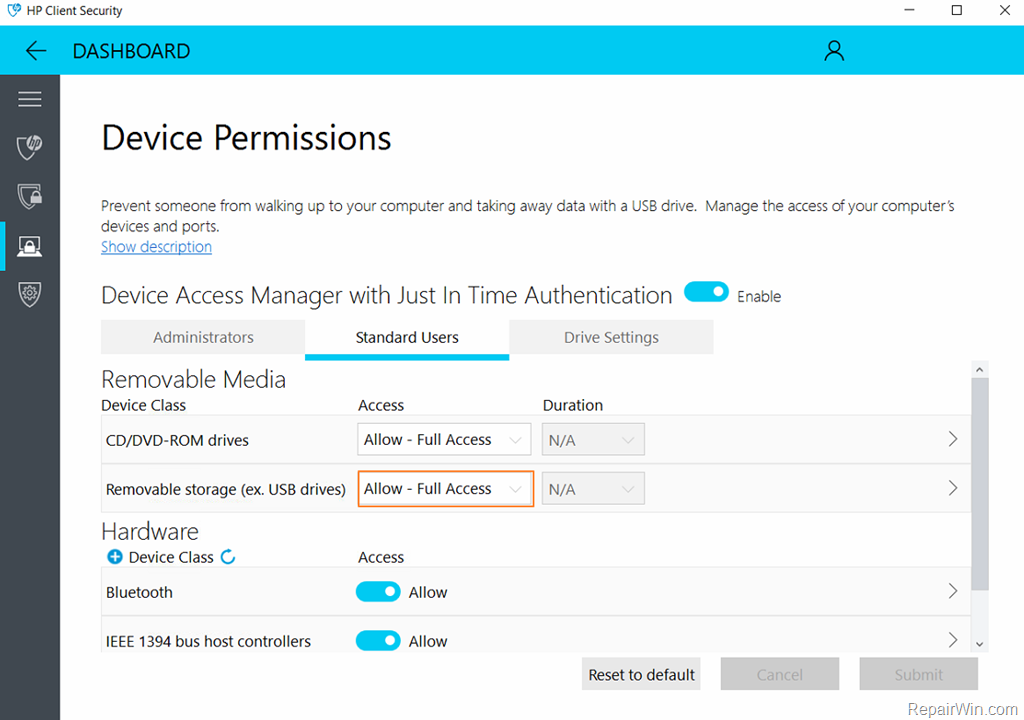
5. Finally, if you don't want the HP Device Access Manger to control the access on the drive, go to Drive Settings and set the corresponding switch to OFF.
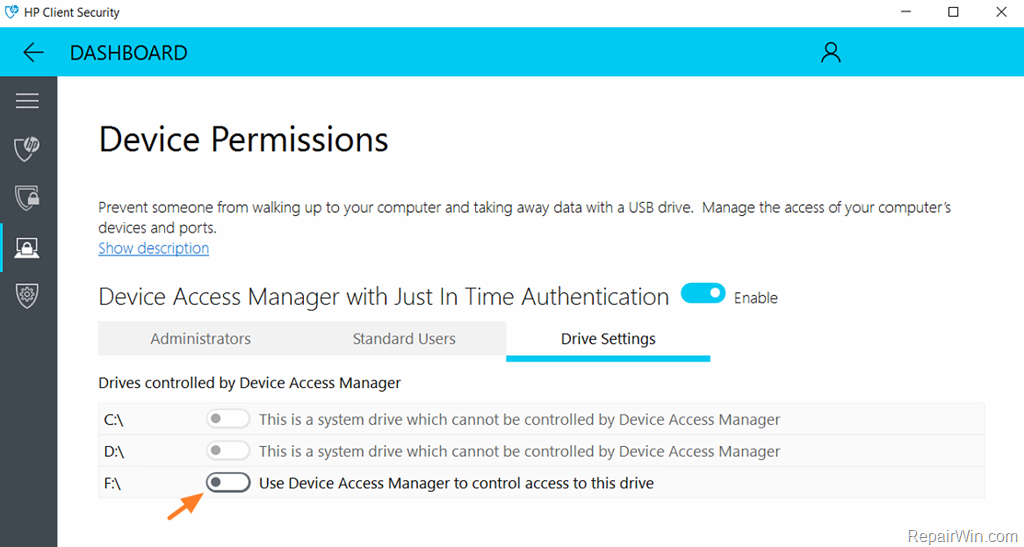
That’s all folks! Did it work for you?
Please leave a comment in the comment section below or even better: like and share this blog post in the social networks to help spread the word about this problem.
Frequently Asked Questions
What should I do if I see the error message 'You don't currently have permission to access this folder' on my HP laptop?
To resolve this issue, open the HP Client Security Manager and navigate to Device Security. Under the Administrators tab, set the 'Removal storage' security to 'Allow – Full Access' and click Submit. Optionally, grant Full Access to Standard Users as well.
Why am I getting a permission error when accessing a USB drive on my new HP ProBook 450 G5?
The permission error is likely caused by security permissions applied by the HP Client Security Manager. Adjusting these settings should allow you to access the USB drive without issues.
How can I prevent the HP Device Access Manager from controlling access to my USB drive?
To prevent the HP Device Access Manager from managing drive access, go to Drive Settings within the HP Client Security Manager and turn the corresponding switch to OFF.




January 18, 2019 @ 6:14 am
I have this same problem. When I open HP Client Security there is no Device Security heading. I only have Identity Security.
March 19, 2019 @ 4:16 am
OMG FINALLY my problem is solved! Everything I plugged into my HP I was denied permission and all the other pages had me going to the security tab and changing permissions which never worked. THANK YOU SO MUCH!!
April 5, 2019 @ 9:21 am
I was convinced this was a Windows 10 problem and I was trying to identify the W10 update that took away my R/W access to the USB drive. Without success, and it was driving me nuts so thanks a lot for showing me it was an HP problem and how to resolve it, you made it very easy!
April 9, 2019 @ 4:51 pm
It worked, thanks
April 14, 2019 @ 5:31 am
Thanks it worked!!! :)
November 10, 2019 @ 10:53 pm
THANK YOU SO MUCH. YOU ARE A REAL LIFESAVER MAN :D
March 25, 2020 @ 12:39 am
Brilliant!! Excelente information for HP users.
April 11, 2020 @ 9:18 pm
Finally it worked! thank you so much!
February 7, 2021 @ 9:43 pm
Thanks, that was a very annoying problem, now solved 100%