
FIX: OneDrive 0x80070184 Error – An unexpected error is keeping you from copying the file. (Solved)
The following error may appear when you try to sync your files with OneDrive "1 Interrupted Action: An Unexpected error is keeping you from copying the file. If you continue to receive this error, you can use the error code to search for help with this problem. Error 0x80070184: The cloud sync provider failed to perform the operation due to network being unavailable."

This tutorial contains instruction to fix the OneDrive error 0x80070184: "An Unexpected error is keeping you from copying the file" in Windows 10/8/7 OS.
How to FIX Error 0x80070184 in OneDrive.
Step 1. Uninstall OneDrive from Windows.
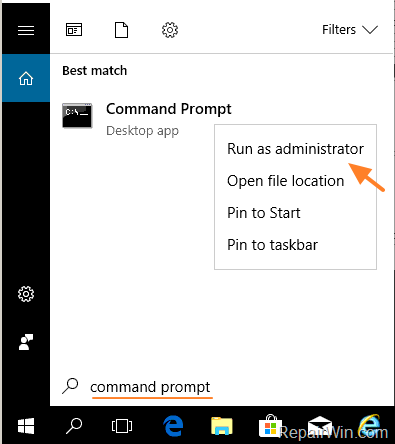
1. Open Command Prompt as Administrator. To do that:
- At the search box type: command prompt or cmd
- Right-click at Command Prompt result and select Run As Administrator.
2. At command prompt give the following command to close OneDrive:
- taskkill /f /im OneDrive.exe
![image_thumb[5]](https://www.repairwin.com/wp-content/uploads/2019/03/image_thumb5.png "image_thumb[5]")
3. Proceed and remove the OneDrive app from your system, by using the below command, according your OS version (32 or 64bit):
- For Windows 64-bit:
- %Systemroot%\SysWOW64\OneDriveSetup.exe /uninstall
- For Windows 32-bit:
- %Systemroot%\System32\OneDriveSetup.exe /uninstall
Step 2. Download and Re-Install OneDrive from Microsoft.
1. Download the latest version of OneDrive.
2. Open the downloaded file (OneDriveSetip.exe) and install OneDrive to your computer.
3. Finally, sign-in to your account and start syncing.
That’s all folks! Did it work for you?
Please leave a comment in the comment section below or even better: like and share this blog post in the social networks to help spread the word about this solution.
Frequently Asked Questions
What is error 0x80070184 in OneDrive?
Error 0x80070184 occurs when OneDrive fails to perform a cloud sync operation due to network unavailability.
How can I fix OneDrive error 0x80070184?
To fix error 0x80070184, uninstall OneDrive using Command Prompt, then download and reinstall the latest version from Microsoft.
How do I uninstall OneDrive using Command Prompt?
Open Command Prompt as Administrator, close OneDrive with 'taskkill /f /im OneDrive.exe', and remove it using '%Systemroot%\SysWOW64\OneDriveSetup.exe /uninstall' for 64-bit or '%Systemroot%\System32\OneDriveSetup.exe /uninstall' for 32-bit systems.
Where can I download the latest version of OneDrive?
You can download the most recent version of OneDrive directly from Microsoft's official website.




February 18, 2020 @ 12:23 pm
Hi, If I uninstall the OneDrive and reinstall again will my old data not got lost?
February 18, 2020 @ 7:48 pm
You will not lose anything.
April 7, 2020 @ 9:13 pm
If you use a VPN, try to deactive it and try to open your document again.
May 29, 2020 @ 12:26 pm
Worked just as described. Thank you.