
How to FIX "LoadLibrary failed with error 1114" on Viber and other Applications (Solved)
If you encounter the "LoadLibrary failed with error 1114: A dynamic link library (DLL) initialization routine failed" error when starting Viber or any other application, follow the steps below to resolve the issue. This error often occurs on laptops due to improper graphics driver configuration or outdated drivers.
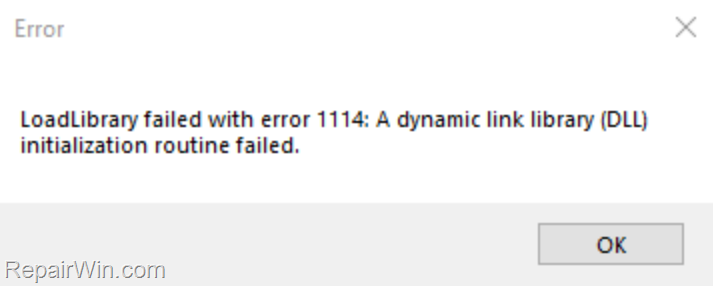
How to FIX LoadLibrary failed with error 1114 on Windows 10/11
Method 1. Set the Switchable Dynamic Graphics to High Performance
The first method to resolve the "Load Library failed with error 1114" error is to adjust the Switchable Dynamic Graphics settings to prioritize high performance. This setting ensures that your system uses the dedicated GPU for demanding applications, enhancing performance and stability.
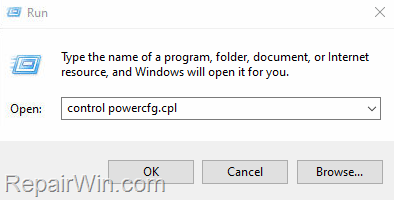
- Press Windows
 + R keys to open the Run command box.
 - Type
control powercfg.cpland press OK (or Enter) to open the Power Options settings.

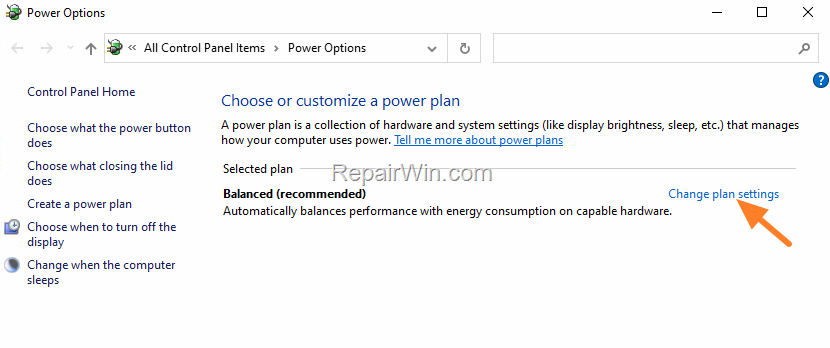
- In Power Options, click Change Plan settings.
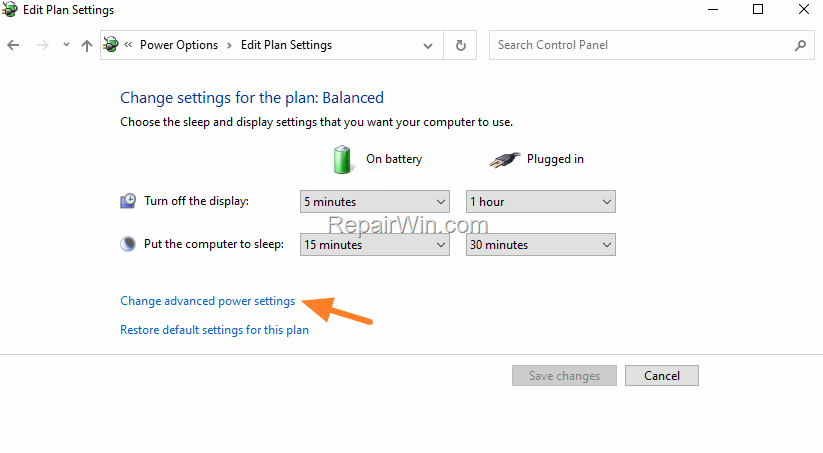
4. Then click Change advanced power settings.
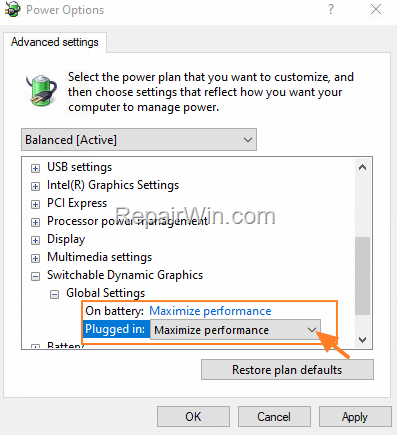
5. In Power Options, scroll down, expand Switchable Dynamic Graphics and under Global Settings set both On Battery & Plugged in to Maximize performance. This adjustment ensures that the system utilizes the GPU for optimal performance, reducing the likelihood of encountering DLL initialization errors.
6. When done, click Apply > OK and then try to start the application.
Method 2. Update the Graphics Drivers
If the error persists after adjusting the power settings, updating the graphics drivers is the next step. Outdated drivers can cause compatibility issues, leading to DLL initialization errors.
- Press Windows + R keys to open the run command box.
- Type:
devmgmt.msc& click OK to open the Device Manager.


- In Device Manager, double-click to expand the Display Adapters.
- Right-click on the installed display adapter(s) and select Uninstall device.
Note: For laptops with two display adapters, uninstall both adapters to ensure all potential driver conflicts are resolved.

- At the next window, check the option "Delete the driver software for this device" and then click Uninstall to completely remove the graphics drivers.

- Restart your PC and go to Windows Update & Check for Updates. Allow Windows to download and reinstall the latest drivers for your graphics adapter(s). This process ensures that your system is running the most current drivers, which can resolve many compatibility issues.
Note: If Windows does not automatically find the required drivers, or if the issue persists, manually download and install the latest display drivers from the manufacturer's website:
- NVIDIA drivers
- AMD drivers
- Intel drivers
Method 3. Adjust System Environment Variables
As an additional step, adjusting the system's environment variables can sometimes prevent DLL initialization errors. This involves setting the JAVA_OPTS or similar variables to ensure that the system allocates sufficient resources for application processes.
- Open the Control Panel and navigate to System > Advanced system settings.
- In the System Properties window, click on Environment Variables.
- Under System Variables, click New and enter the variable name and value, such as
JAVA_OPTSwith a value of-Xmx512Mto allocate 512MB of memory. - Click OK to save the changes and restart your computer.
Summary
To resolve the "LoadLibrary failed with error 1114" error, first adjust your Switchable Dynamic Graphics settings to high performance. If the issue persists, update your graphics drivers via Device Manager or the manufacturer's website. Additionally, consider adjusting system environment variables to ensure optimal resource allocation. These steps should help eliminate the error and improve application stability.
Read next: How to Activate Dark Mode on Viber (Android & iOS)
We hope this guide helps you resolve the issue. Please leave a comment below to let us know if these solutions worked for you, and feel free to share this article to help others facing similar issues.
Frequently Asked Questions
What does the error 'LoadLibrary failed with error 1114' indicate?
The error 'LoadLibrary failed with error 1114' usually indicates that a dynamic link library (DLL) initialization routine has failed, often due to graphics driver configurations on laptops.
How can I fix the 'LoadLibrary failed with error 1114' on Windows 10/11?
To fix this error, try setting the Switchable Dynamic Graphics to high performance or updating your graphics drivers following the detailed instructions provided.
What should I do if updating the graphics drivers doesn't fix the error?
If the error persists after updating the graphics drivers, ensure that you've installed the latest drivers from the graphics adapter manufacturer's website, such as NVIDIA, AMD, or Intel.



