
How to Activate Dark Mode on Viber (Android & IOS)
This tutorial contains instructions to activate the Viber dark mode theme on your Android or IOS device. Viber dark mode, allows you to change the white background to black in, in order to make easier the reading on Viber app especially in low-light conditions.
Viper dark mode is available for IOS and Android devices and can be enabled by following the instructions below.
How to Enable or Disable Viber Dark Mode on Android, iPhone & iPad.
1. Open the Viber App, tap More on the bottom right and then tap Settings

2. Then tap Appearance.
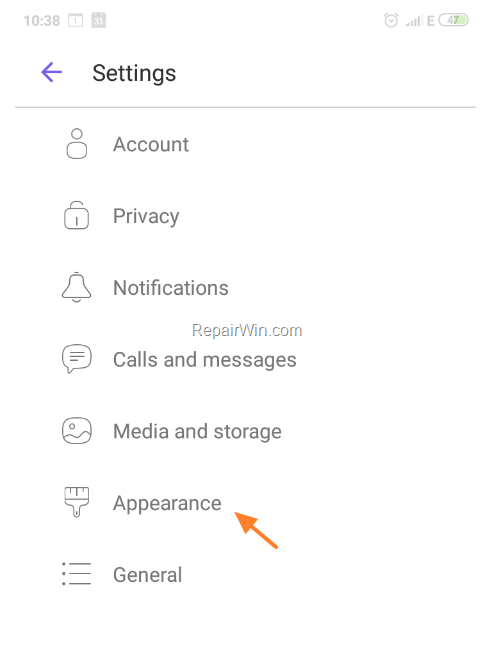
3. Turn on Dark Mode.
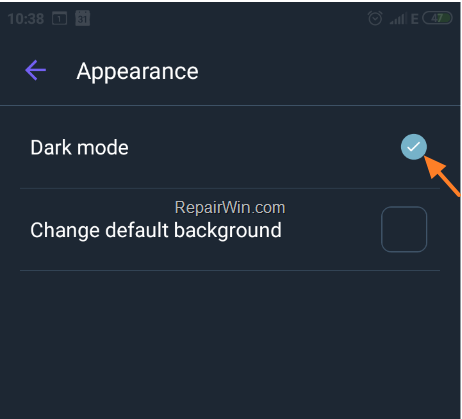
That’s all folks! Did it work for you?
Please leave a comment in the comment section below or even better: like and share this blog post in the social networks to help spread the word about this problem.
Frequently Asked Questions
How do I activate Viber's dark mode on my Android or iOS device?
To activate Viber's dark mode on Android or iOS, open the Viber app, tap 'More' at the bottom right, then tap 'Settings'. Next, tap 'Appearance' and turn on 'Dark Mode'.
Why should I use the Viber dark mode?
Viber dark mode is beneficial as it changes the white background to black, making it easier to read in low-light conditions.
Is Viber dark mode available for both Android and iOS devices?
Yes, Viber dark mode is available for both Android and iOS devices, including iPhones and iPads.
What should I do if the dark mode didn't activate?
If dark mode did not activate, ensure you've followed the instructions correctly. You can also try restarting the app or checking for updates.



