
FIX: Cannot Find Skype App in Windows 10 (Solved)
After a Windows 10 update the following error may appear at startup: "Windows cannot find 'C:\Program Files\WindowsApps\Microsoft.SkypeApp…\Skype\Skype.exe'. Make sure you typed the name correctly, and then try again." If you face the "Cannot find Skype App" error at Windows 10 startup, continue reading below.
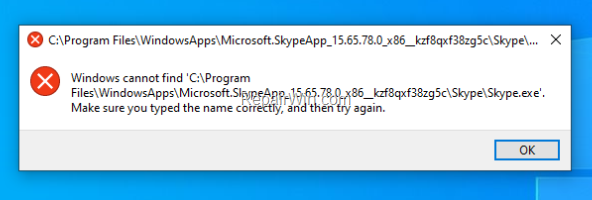
This tutorial contains instructions to resolve the error "Cannot Find Skype App" in Windows 10.
FIX: Skype App Cannot Start – Windows Cannot Find Skype App.
Step 1. Uninstall Skype App.
1. From Start menu ![image_thumb[2]_thumb](https://www.repairwin.com/wp-content/uploads/2019/02/image_thumb2_thumb-1.png "image_thumb[2]_thumb") click Settings
click Settings  and then open Apps.
2. Select the Skype app in the list and click Uninstall.
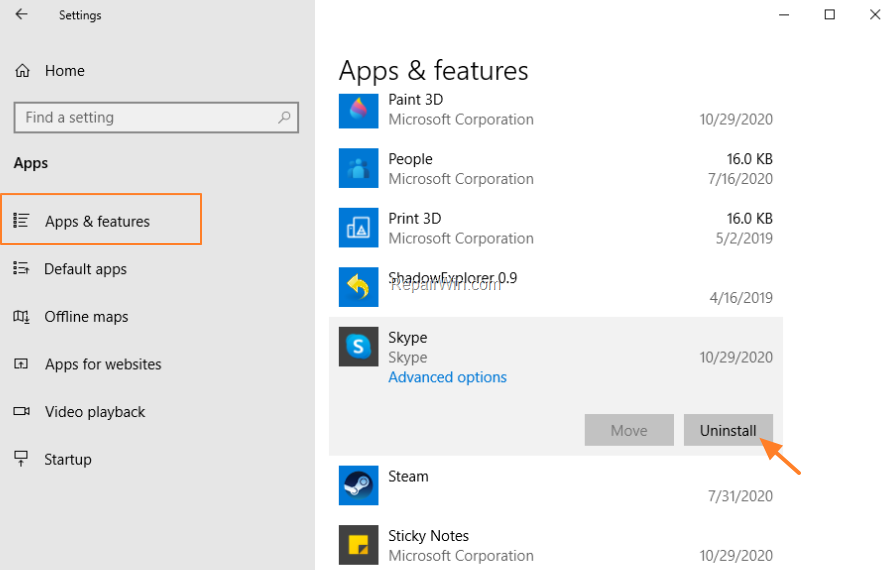
3. When the uninstall is completed, restart your PC.
4. After restart, if you still receive the error "Cannot Find Skype App" proceed to step 2
Step 2. Re-Install Skype App.
1. Open the Microsoft Store.
2. Type Skype in the search bar and then click at the Skype app on the list.

3. Click Get to install Skype on your PC.

4. When the installation completed, restart your PC. Normally, the message "Cannot Find Skype App" should no longer be displayed. *
* Note: If you still receive the message "Cannot find Skype app" (Skype application could not be found), follow the instructions from step-1 above to uninstall the Skype App from your PC and then install the Skype for Desktop app.
That's all folks! Did it work for you?
Please leave a comment in the comment section below or even better: like and share this blog post in the social networks to help spread the word about this solution.
Frequently Asked Questions
What should I do if I encounter the 'Cannot find Skype App' error after a Windows 10 update?
You should first try uninstalling the Skype App. Go to the Start menu, click Settings, and open Apps. Then select the Skype app in the list and click Uninstall. After uninstalling, restart your PC.
What steps should I take if the error persists after uninstalling Skype?
If the error persists after uninstalling, you should re-install the Skype app. Open the Microsoft Store, search for Skype, and click Get to install it on your PC. After installation, restart your PC to check if the issue is resolved.
What if reinstalling the Skype app doesn’t resolve the issue?
If you still receive the 'Cannot find Skype app' message after reinstalling, you can try uninstalling the Skype App once more and then install the Skype for Desktop app.



