
Unable to Uninstall a Program in Windows (Solved)
In some cases, the usual method to uninstall a program from your computer (Control Panel > Programs and Features), doesn't work as expected or causes problems that prevent the program uninstall. The uninstall issues are often caused because, during the installation process several modifications are done by the installer on the system, which the uninstaller program can not remove.

Uninstall Problems that Solved with this Guide:
"An error occurred while trying to uninstall…"
"Error 1001. An exception occurred while uninstalling"
"You have not sufficient access to uninstall "
"Unable to completely uninstall Application"
"Unable to Uninstall program…"
"Uninstaller Error: An error occurred while trying to remove program"
"There is a problem with this Windows Installer package. A program required for this install to complete could not be run. Contact your support personnel or package vendor"
If you cannot uninstall a program from your computer and you receive one of the above errors, then follow the methods mentioned below to resolve the uninstall problem.
How to Uninstall a Program that Won't Uninstall through "Programs and Features" (Add/Remove Programs).
Note: Before you continue, make sure that you have Administrative rights on your computer and your system is clean from viruses and malware programs.
Method 1. Remove a Program by using Microsoft Program Install and Uninstall Utility.
1. Download and run the Microsoft Program Install and Uninstall Utility.
2. Click Next at the first screen.
3. Next, select the Uninstalling option.

4. From the list of installed programs, choose the program that you want to remove and click Next.

5. When the removal is completed, check if the uninstall problem is fixed.
Method 2. Force Remove a Program by using Geek Uninstaller Utility.
1. Download and extract the GeekUninstaller (geek.zip) utility to your computer.
2. Double click to launch the geek application.
3. Right-click at the program you wish to remove and select Force Removal.
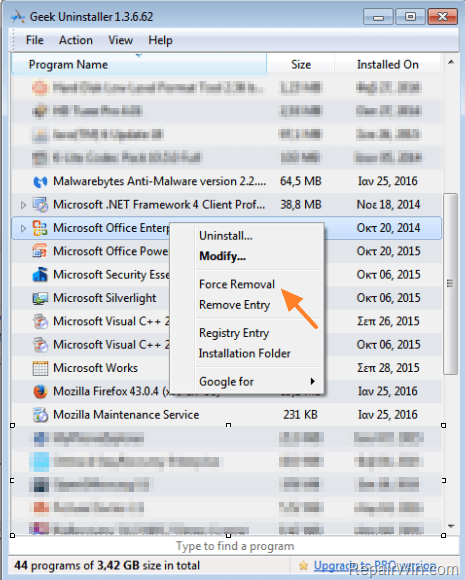
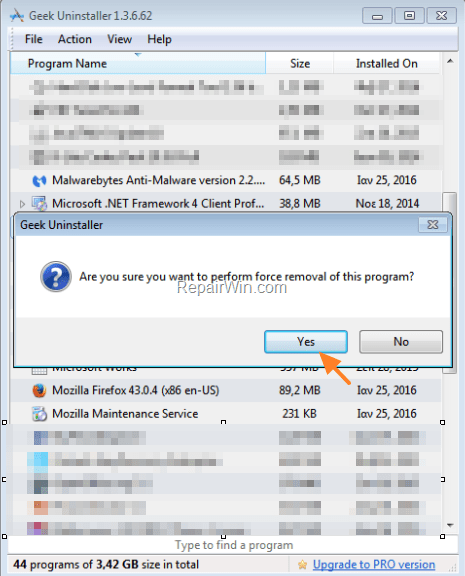
4. Ask Yes at the next window and then let the Geek Uninstaller utility to completely remove the program and all its traces from your computer.
That’s all folks! Did it work for you?
Please leave a comment in the comment section below or even better: like and share this blog post in the social networks to help spread the word about this.




June 4, 2019 @ 7:14 pm
Thank you. It worked like a charm
July 29, 2019 @ 6:39 pm
Thanks for you solution, i resolved this problem in windows server 2012 R2
November 14, 2019 @ 5:38 am
wow..using Geek Uninstaller really works. Thanks a lot.
February 26, 2020 @ 10:56 pm
Worked perfectly. Thank you.
May 1, 2020 @ 2:00 pm
What of the best article I ever find.
May 14, 2020 @ 1:49 am
I think I love you! Seriously thank you:)
May 29, 2020 @ 5:54 pm
Thanks alot it works perfectly,finally my worries have come to an end.
June 10, 2020 @ 4:59 pm
Yes bro. now its attempting to resolve my issue. Let me see the final result
June 10, 2020 @ 5:05 pm
Yessssssssssssss., its worked., thanks for your support., God Bless You
March 12, 2021 @ 1:24 pm
Yes it did work fine
May 2, 2021 @ 7:04 pm
o my god what a relief finally able to uninstall that piece of crap thank you soo much !
January 1, 2022 @ 9:40 pm
I used Geek Uninstaller and it was like magic cleaning my pc from all unwanted malware software. Thank you from all my heart.
January 1, 2026 @ 6:37 am
I must really thank you for providing this wonderful guide, which still works perfectly in the year 2026! Tried the Geek uninstaller but did not work. Luckily the Microsoft one worked perfectly. Thanks again, and Happy 2026!