
How to FIX "Too many posts were made to a semaphore when applying attributes to the file" (Solved)
If you encounter the error message "Too many posts were made to a semaphore" while attempting to modify the attributes of an application (.exe) file, this guide will provide you with the necessary steps to resolve the issue efficiently.
The "Error Applying Attributes: An error occurred applying attributes to the file 'name-of-file.exe'. Too many posts were made to a semaphore" typically manifests when attempting to alter the attributes of a "Read Only" file. This often occurs when you try to "Unblock" an application or file originating from an untrusted publisher.
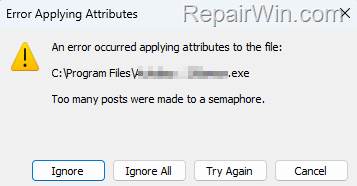
How to Fix: Cannot Unblock File – Too many posts were made to a semaphore, on Windows 10/11.
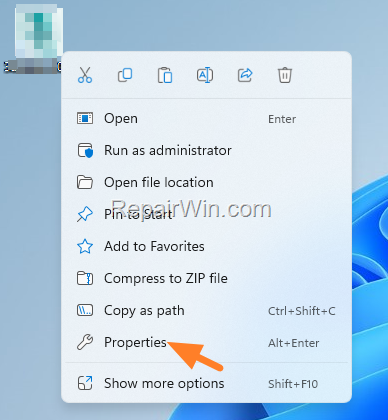
1. Right-click on the file or program that generates the error and select Properties.
This action opens the Properties dialog box, which provides access to the file's attributes and security settings. By accessing this menu, you can modify the file's properties to resolve the semaphore error.
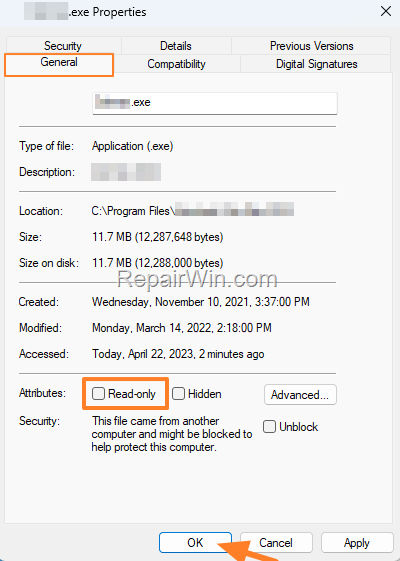
2. In the General tab, uncheck the Read-only checkbox and click OK.
Unchecking the "Read-only" attribute allows the file to be modified, which is crucial for unblocking files from untrusted sources. This action removes restrictions that prevent changes to the file's attributes.
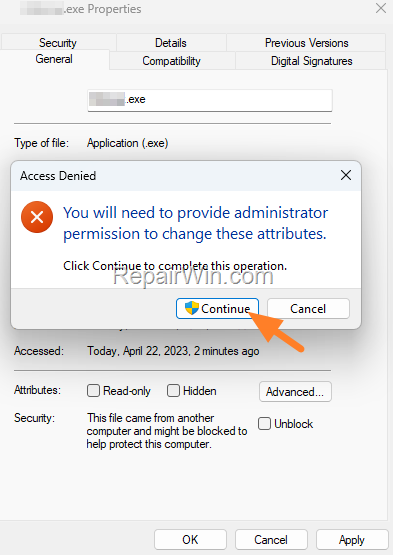
3. Click Continue on the "Access Denied" message, and you're done! Now try to change the attributes of the program.
By clicking "Continue," you grant the necessary permissions to alter the file's attributes, even if initially restricted. This step is essential to bypass security prompts that prevent unauthorized modifications.
We hope this guide has been helpful. If you have any questions or feedback, please leave a comment below. Don't forget to share this article with others who might benefit from it!
Frequently Asked Questions
What causes the 'Too many posts were made to a semaphore' error?
This error usually appears when you attempt to modify the attributes of a 'Read Only' file, such as unblocking an application from an untrusted publisher.
How can I fix the 'Error Applying Attributes' message on Windows 10/11?
To fix the error, right-click the problematic file or program, select Properties, uncheck the 'Read-only' checkbox in the General tab, and click OK. After acknowledging any 'Access Denied' messages by clicking Continue, try changing the file attributes again.
Does the solution for the semaphore error work for all files?
This solution is specifically addressing the issue with 'Read Only' files on Windows 10/11. Its effectiveness may vary based on the file type and system configuration.




January 10, 2024 @ 8:49 pm
This worked! I looked all over for an answer and finally found this. Very simple solution and very helpfull. Thank you!
December 23, 2025 @ 9:12 am
thank you, it worked windows 11