
FIX: Adobe Reader DC – Save As is blank (Solved)
After a Adobe Reader DC automatic update, the following problem occurred: The "Save As" feature displays a blank (empty) window (blank) that does not allow the user to save the PDF document.
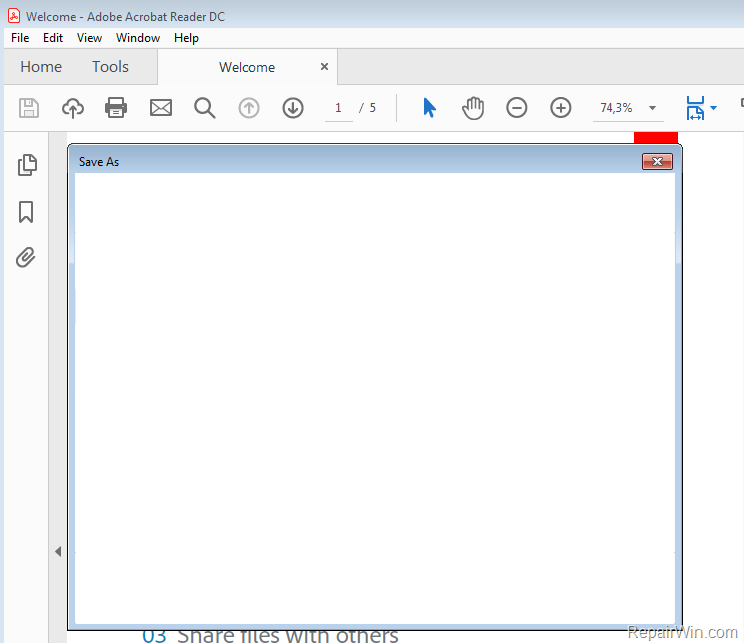
This tutorial contains instructions to resolve the following problem: "Save As" feature, does not work in Adobe Reader DC in Windows or MAC OS.
How to FIX: Save As window is blank in Adobe Reader DC.
Method 1. Scan your system for Viruses and Malware.
The first step to resolve the "missing folders" problem in Outlook, is to ensure that your system is virus/malware free. For that task follow the instructions in this guide: How To Scan Your Computer for Viruses and other Malicious Programs.
Method 2. Disable Online Storage when saving files.
1. From Adobe Reader DC Edit menu click Preferences.

2. Uncheck the Show online storage when saving files and click OK. *
* Note: Optionally, uncheck also the "Show online storage when opening files" feature.
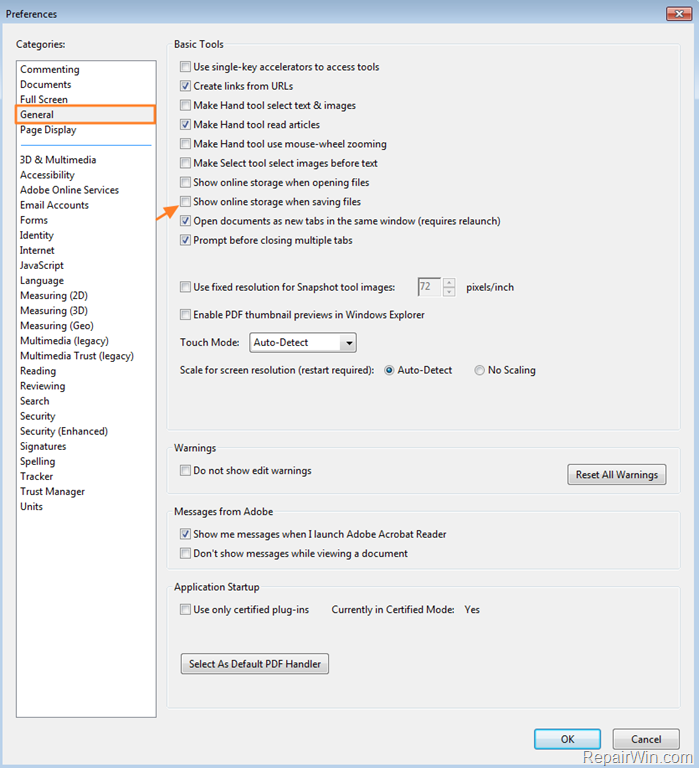
3. Now try to use the Save As feature in Adobe DC. The problem must be resolved.
Method 3. Uninstall and reinstall Adobe Reader DC.
The final method to resolve the blank windows in 'Save As" feature in Adobe DC, is to completely uninstall the Adobe Reader DC and then to download and reinstall the latest version of the program from here.
That’s all folks! Did it work for you?
Please leave a comment in the comment section below or even better: like and share this blog post in the social networks to help spread the word about this.
Frequently Asked Questions
Why is the 'Save As' feature showing a blank window in Adobe Reader DC?
The 'Save As' feature may show a blank window due to issues such as online storage settings or requiring an update to the software. It may also be impacted by malware.
How can I fix the blank 'Save As' window issue in Adobe Reader DC?
You can resolve this issue by scanning your system for viruses and malware, disabling online storage when saving files, or uninstalling and reinstalling Adobe Reader DC.
How do I disable online storage to fix the 'Save As' blank window in Adobe Reader DC?
Go to Adobe Reader DC's Edit menu, click on Preferences, and uncheck the 'Show online storage when saving files' option. You may also want to uncheck 'Show online storage when opening files.'




April 2, 2020 @ 9:25 pm
thank youuuuuuuuuu!!!!!!!!
May 21, 2020 @ 8:38 am
Thank you, very easy fix and it works :-)
February 12, 2021 @ 9:17 pm
Another option before re-downloading the entire program is to run a repair. Simply go to Help – Repair Installation, just another thought.
March 2, 2021 @ 3:27 pm
Worked! Saved me a lot of headache…
September 17, 2021 @ 5:07 pm
Holy Poop, it worked! Once I deleted the check mark by "Show online storage when saving files"
SHAZAM! It worked! Thank you so much!
September 24, 2021 @ 10:06 pm
Works, but issue comes right back again the next day
November 9, 2021 @ 3:44 pm
I wish this fix was permanent. I have to repeat it every time I re-open the application.
November 21, 2021 @ 5:21 pm
It works….thanks a lot!!
November 23, 2021 @ 12:05 pm
Awesome!!! Thank you!!!!
December 27, 2021 @ 6:23 pm
thanks
February 11, 2022 @ 5:07 pm
Solved. Thanks