
FIX: Cannot Install CorelDraw X8 because another version is already installed. (Solved)
This tutorial contains instructions to resolve the following error when trying to install CorelDraw X8:"The installation was not completed. You cannot install this product because another version is already installed. To uninstall this product, you must first uninstall the existing version".
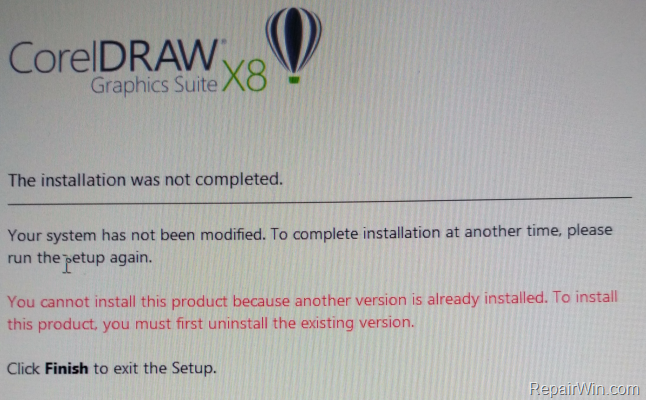
How to fix CorelDraw X8 install error: Cannot install this product because another version is already installed.
To bypass the CorelDraw x8 installation error, follow the steps below:
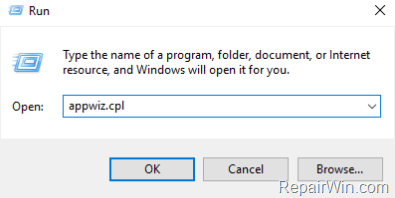
1. Press simultaneously the Windows  + R keys to open the run command box.
2. Type: appwiz.cpl and click OK.
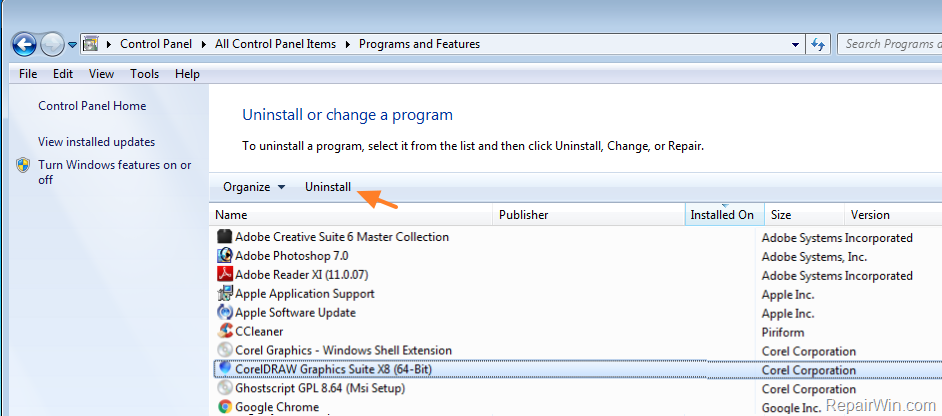
3. In Programs and Features, Uninstall the following programs from "Corel Corporation": *
-
- CorelDraw Graphics Suite X8
- Corel Graphics – Windows Shell Extension.
- Ghostscript GPL
* Note: If you cannot remove the CorelDraw applications, using the usual "Uninstall" method, then download and run the "Microsoft_Program_Install_and_Uninstall" utility to remove them.
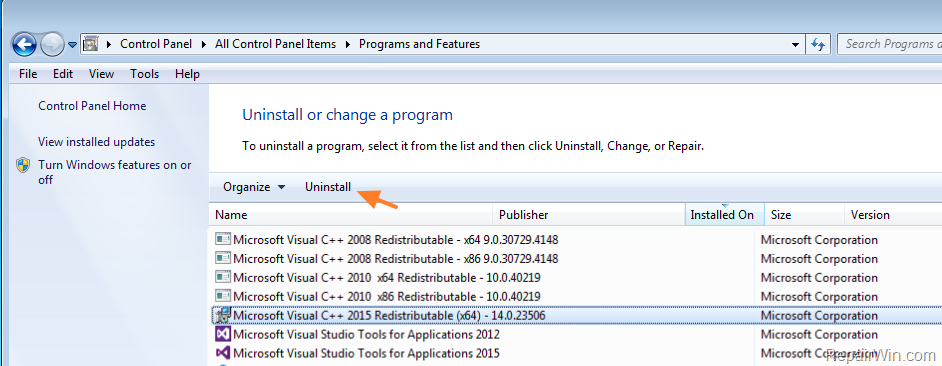
4. Then uninstall the following programs from Microsoft:
-
- Microsoft Visual C++ 2015 Redistributable (x86)
- Microsoft Visual C++ 2015 Redistributable (x64)
- Microsoft Visual C++ 2017 Redistributable (x86)
- Microsoft Visual C++ 2017 Redistributable (x64)
5. Proceed and install CorelDraw X8.
That’s all folks! Did it work for you?
Please leave a comment in the comment section below or even better: like and share this blog post in the social networks to help spread the word about this solution.
Frequently Asked Questions
What is the recommended solution for the CorelDraw X8 installation error?
To resolve the CorelDraw X8 installation error, uninstall existing versions of CorelDraw and related Microsoft Visual C++ Redistributables using 'appwiz.cpl'. If standard uninstallation doesn't work, use the 'Microsoft_Program_Install_and_Uninstall' utility.
What should I do if standard uninstallation methods fail?
If you cannot remove CorelDraw applications using the standard 'Uninstall' method, download and run the 'Microsoft_Program_Install_and_Uninstall' utility to forcefully remove them.
Which Microsoft Redistributables need to be uninstalled to fix the issue?
Uninstall the following Microsoft Redistributables: Microsoft Visual C++ 2015 Redistributable (x86) & (x64), and Microsoft Visual C++ 2017 Redistributable (x86) & (x64).
How can I provide feedback on the solution's effectiveness?
You can leave a comment in the comment section below the tutorial or like and share the blog post on social networks to help spread the word about the solution.




April 22, 2019 @ 5:37 am
Oh, man.
You saved my life (and my hair, because I was pulling'em out!).
It was that simple and that unexpected.
Thanks!!
June 15, 2019 @ 9:09 am
yes, exactly
October 13, 2019 @ 11:45 am
Thanks very much
May 6, 2019 @ 7:50 am
I dont have Visual C++ 2015 redistributable 2015, yet it gives the error. What to do?
May 6, 2019 @ 9:01 am
@karan: Proceed and uninstall all other versions of "Microsoft Visual C++" and also remove the programs mentioned in the article.
May 7, 2019 @ 5:59 pm
I need the Microsoft Visual C++ why it has something to do with it. Is there another way ?
May 7, 2019 @ 6:04 pm
Derthiel: Re-Install the Visual C++ after installing Corel.
November 22, 2020 @ 2:52 pm
Thank you very much. It worked!
October 9, 2019 @ 10:20 pm
Thanks.It worked perfectly
May 13, 2019 @ 7:17 am
You will have to uninstall Visual C++ 2015 and above
May 9, 2019 @ 2:00 am
Thanks, it worked! It has successfully passes that stage.
But initially it was saying something like some features are deactivated after I connected to the internet while using it. I think it was deactivated when I connected to the net. That's why I had to uninstall.
Does the above steps also clear that or what can I do in that case?
May 9, 2019 @ 8:59 am
PrinceDee: Are you installing a legitimate version of Corel? I think that is the problem…
May 11, 2019 @ 12:24 pm
Great…
May 28, 2019 @ 12:08 am
Thanks! It worked for me!
June 8, 2019 @ 1:08 pm
thanks
June 11, 2019 @ 3:46 pm
Thank you. I was totally disturbed until your post helped me fixed it.
June 19, 2019 @ 12:04 pm
Wow, thanks this worked fine for me.
June 23, 2019 @ 7:12 pm
Thanks so much, it worked.
July 5, 2019 @ 5:51 pm
Thanks you so much.. it worked.
July 21, 2019 @ 5:22 pm
thanku, it works
July 26, 2019 @ 7:42 am
Thank you. It worked.
July 26, 2019 @ 3:14 pm
How Can I Reinstall Those Microsoft Visual Back?
July 26, 2019 @ 3:21 pm
Microsoft Visual C++ 2015
Microsoft Visual C++ 2017 32-bit
Microsoft Visual C++ 2017 64-bit
July 30, 2019 @ 1:40 am
installing… works great..thanks man
August 7, 2019 @ 5:26 pm
God bless you!. It worked!
August 12, 2019 @ 5:52 pm
Worked!
August 29, 2019 @ 6:56 am
Thanks . It's working
September 9, 2019 @ 4:23 pm
Excellent, worked like a charm.
September 19, 2019 @ 3:54 pm
Thank so much! Can't thank u enough
September 21, 2019 @ 7:10 am
Thanks still works. Corel x8
September 23, 2019 @ 10:06 am
Yes, it works for me. In my case, I only need to uninstall
Microsoft Visual C++ 2015 Redistributable (x64)
since the other 3 don't exist
Thank you
September 23, 2019 @ 4:04 pm
Thanks its worked perfectly
November 3, 2019 @ 8:42 am
It works
November 14, 2019 @ 8:37 am
Thanks, worked like a charm!
November 21, 2019 @ 2:10 pm
Thanks a million! Worked a charm.
November 26, 2019 @ 3:42 am
You are my new hero. I've fought this dang program for years. This time I was afraid it was going to be gone for good. Take the rest of the afternoon off with pay! Thank you!!!
December 5, 2019 @ 2:06 am
God bless you boss.
December 16, 2019 @ 5:36 pm
thanks it work
December 16, 2019 @ 9:19 pm
thanks, worked perfectly.
January 8, 2020 @ 8:26 pm
I'm so happy, it really worked. I was just cracking my head earlier. Thank you so much friend, God richly bless you.
January 29, 2020 @ 6:37 am
Yes, it worked. Thanks a lot.
February 8, 2020 @ 11:44 am
Thank you so much. It worked.
February 10, 2020 @ 6:58 pm
Works greatly.
Tganks
February 23, 2020 @ 11:58 pm
You are a GENIUS!!!!! Thanks, you saved me.
March 14, 2020 @ 7:48 pm
Thanks much boss. Worked
March 24, 2020 @ 9:59 pm
Funciona perfectamente, Muchas gracias!!!!
April 6, 2020 @ 12:39 pm
Thanks bro it works fine
April 15, 2020 @ 12:06 am
Removing MS Visual C++ did it for me. Thanks!
May 2, 2020 @ 4:30 am
removing MS Visual c++ 2015 and 2017 did not work for me, anything else?
May 2, 2020 @ 10:05 am
If you have other versions of Visual C++, remove them as well.
May 4, 2020 @ 7:41 pm
I uninstalled all & their registry also
Microsoft Visual C++ 2015 Redistributable (x86)
Microsoft Visual C++ 2015 Redistributable (x64)
Microsoft Visual C++ 2017 Redistributable (x86)
Microsoft Visual C++ 2017 Redistributable (x64)
still, I am getting an error what should I do now?
(You cannot install this product because another version is already installed. To install this product, you must first uninstall the existing version)
May 6, 2020 @ 10:43 am
Uninstall any version of "Microsoft Visual C++ Redistributable"
May 17, 2020 @ 8:34 am
Thanks, it worked!
May 19, 2020 @ 11:10 am
thanks, it worked
May 20, 2020 @ 11:44 pm
Yessss !!
May 22, 2020 @ 3:45 pm
Yeah, it worked for me too. Thanks a lot.
May 27, 2020 @ 6:35 pm
Hi thank you for this valuable information you it really helpful because we all know that Coreldraw is very important it is vector-based designing software that is used for creating logos, flexes, brochures, invitation cards and any kind of vector designing based on the lining.
June 3, 2020 @ 11:26 am
Yeah, it worked for me too. Thank you so mush.
June 11, 2020 @ 4:35 pm
Thanks a lot boss and don't stop Sharing ideas even if not all, and I'm sure with this generous things you do, God will surely open ways for you, I'm indeed Grateful
June 18, 2020 @ 7:37 am
thanks bro its worked
June 18, 2020 @ 3:05 pm
Thanks man…. it worked ….
July 12, 2020 @ 9:32 pm
It worked perfectly! God bless you
Thanks
July 14, 2020 @ 2:14 am
Thanks, it works
July 21, 2020 @ 2:37 pm
worked man, thanks
July 29, 2020 @ 10:53 am
It worked thanks
August 26, 2020 @ 1:49 pm
I have uninstalled every Microsoft Visual C++ , every corel program , the shell extension, ghostscript pcl, visual studio and everything else I can think of and still get the error. I have manually checkd and rechecked my regrty for any corel app and there are none but still getting the error . Are there any suggstions. I feel that corel has stoppd support for thisversion and is forcing an upgrade.SMH
September 13, 2020 @ 7:02 am
YES it work sir thank you
October 20, 2020 @ 9:46 am
It works for me, thanks.
October 24, 2020 @ 10:58 pm
Thanks so much
November 20, 2020 @ 6:15 am
It's worked like magic
Thanks a lot
November 21, 2020 @ 8:32 pm
Thanks Dude!
Work perfectly!
December 19, 2020 @ 5:45 pm
It all worked!!
Thanks alot
December 21, 2020 @ 9:37 pm
its working thanks sir
January 3, 2021 @ 12:36 pm
Thanks much. Worked well for me
February 15, 2021 @ 9:01 am
Thanks! It worked for me!
February 25, 2021 @ 8:51 am
Thank you for saving me. I spent d whole night battling with this, but as soon as I read this article, it was all done. 👍
July 4, 2021 @ 6:11 am
Solved.. Installed.. You are cool..
Is Corel 19 or 20 out? Does anyone have it?
July 24, 2021 @ 9:49 pm
Thanks. It works
August 17, 2021 @ 1:46 am
Thanks worked for me too..
August 25, 2021 @ 10:58 pm
thanks a whole lot…. you are a genius…
August 25, 2021 @ 11:00 pm
thanks a whole lot… you are a genius
September 23, 2021 @ 12:54 pm
Thanks so much. Your article saved me from hours of frustration. Cheers
December 10, 2021 @ 7:09 am
That worked for me. Thanks a lot.
April 29, 2022 @ 3:50 am
thank you so much, it works like a charm :'D
May 3, 2022 @ 12:41 pm
yes, exactly
very very tnx
May 17, 2022 @ 8:41 pm
Thanks man.
August 9, 2022 @ 4:46 pm
This is great. It worked for me. Thank you very much for your right information
September 14, 2022 @ 6:22 am
Thank you so much!
September 17, 2022 @ 3:27 pm
2022 and this still worked! Thanks!
March 6, 2023 @ 11:12 pm
Thanks for the tip. it worked. Really grateful.
April 10, 2023 @ 5:14 pm
Works great! Thx very much!
April 13, 2023 @ 6:40 pm
Thanks, it has worked
April 24, 2023 @ 8:40 pm
thanks it worked perfectly
May 28, 2023 @ 5:27 am
You rock man. Thankyou so much. It was driving me crazy. I didn’t know they were linked to Corel. Thankyou so much. When it finally installed I see that those files get installed again. Hence why it was saying it was already installed. Thankyou again.
October 5, 2023 @ 11:56 am
yes it worked.
November 7, 2023 @ 3:13 pm
Oh God Works great! Thx very much! Amazing Solution
December 3, 2023 @ 2:06 pm
thanks alot it was very helpful, I really appreciate your effort of putting this solution online.
My Regards
Aaron Paul Kelly
January 1, 2025 @ 5:06 am
Bravo! A simple solution to a pestering problem. Thanks a lot Bro, really it helped me a lot!