How to STOP Seeding in uTorrent.
Many of us have used uTorrent to download movies or other files over the years, as it is the most popular P2P client for downloading or sharing large files over the Internet. But, sometimes you need to stop seeding in uTorrent, because you need all the available Internet bandwidth (speed), to upload or to download a large file (via uTorrent).
In this article you'll find step-by-step instructions on how to completely disable seeding in uTorrent and how to stop seeding after download.
How to Turn-off Seeding in uTorrent.
A. To temporarily stop seeding while downloading or uploading files in uTorrent:
1. Click on the torrent in your Torrent Feed and click the STOP button, or press the Recycle icon to remove the seeding file form the list.

B. To completely disable uTorrent seeding, proceed as follows:
1. From Options menu, click Preferences.
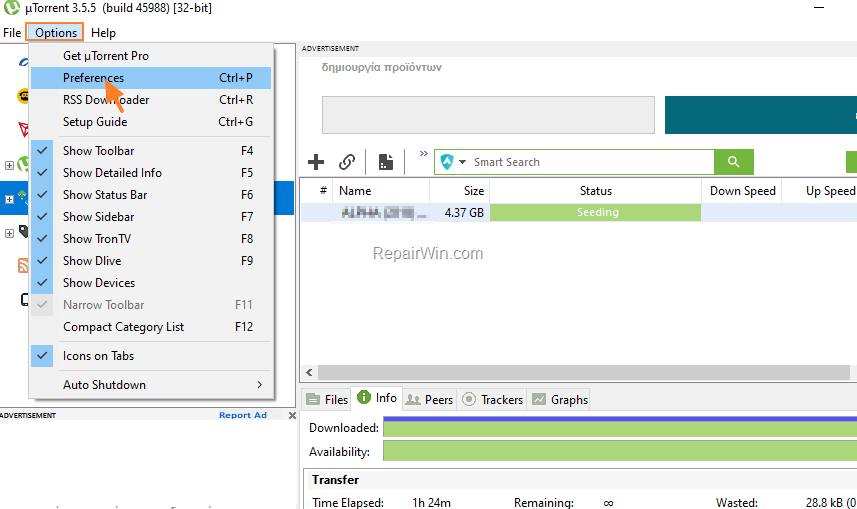
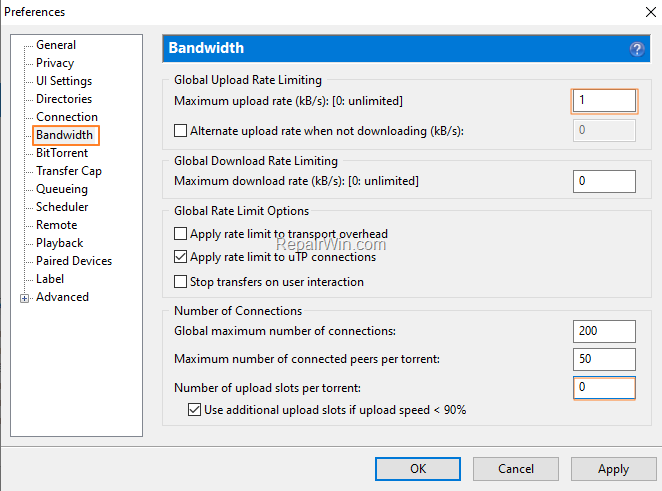
2. In Bandwidth options, make the following changes and then click OK.
- Set the Maximum Upload Rate (kB/s) to 1.
- Set the Number of upload slots per torrent to 0.
C. To automatically prevent the uTorrent seeding when a torrent file is downloaded.
1. From Options menu, click Preferences.
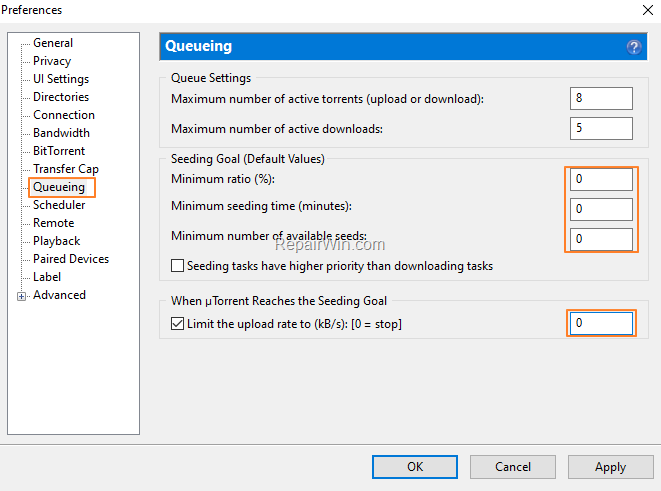
2. In Queueing options, make the following changes and then click OK.
- Set the Minimum Ratio (%) to 0
- Set the Minimum seeding time (minutes) to 0
- Set the Minimum number of available seeds to 0
- Check the Limit the upload rate checkbox and type 0 in the box.
That's all folks! Please leave a comment in the comment section below or even better: like and share this blog post in the social networks to help spread the word about this solution.
Frequently Asked Questions
How can I temporarily pause seeding in uTorrent?
To temporarily stop seeding, click on the torrent in your Torrent Feed and either click the STOP button or press the Recycle icon to remove the seeding file from the list.
What are the steps to completely disable seeding in uTorrent?
To completely disable seeding in uTorrent, go to the Options menu, click Preferences, and make the following changes under Bandwidth options: set the Maximum Upload Rate (kB/s) to 1 and the Number of upload slots per torrent to 0. Then, click OK.
How can I automate stopping seeding after a download completes in uTorrent?
From the Options menu, click Preferences. Under Queueing options, set the Minimum Ratio (%) to 0, Minimum seeding time (minutes) to 0, Minimum number of available seeds to 0, check the Limit the upload rate checkbox, and enter 0 in the box. This will stop seeding automatically after download.