
FIX: Viber, Yahoo and other Apps are Crashing on Android Devices – March 2021 (Solved).
Several users in the last few hours have reported that many Android apps are crashing (March 22, 2021). In particular, Gmail, Viber, Google Chrome and other important apps do not open and close immediately after opening. The problem affects many Android devices and especially Samsung's devices. If you face a similar problem continue reading below to learn how to fix it.
Update (March 23, 2021): Google quickly identified the problem and found that the Android WebView app was the culprit and fixed it by pushing updates for it and other Chrome apps.
How to FIX: Android Google Apps, Viber, etc. Crash issue (March 22, 2021).
1. Open Android Settings.
2. Tap Manage Apps (or Apps & Notifications or Applications on some Android devices).
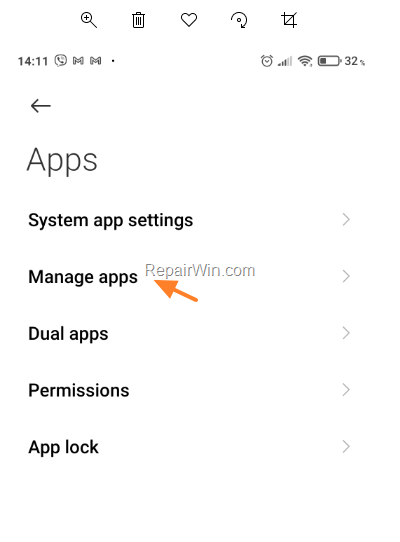
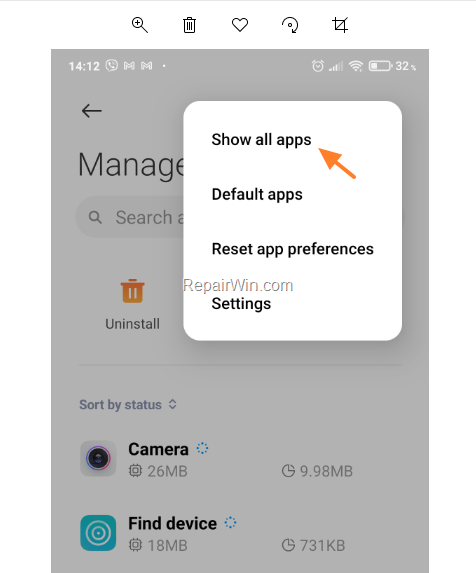
3. Click the menu with the three dots  in the upper right corner and select Show all apps (or Show system apps).
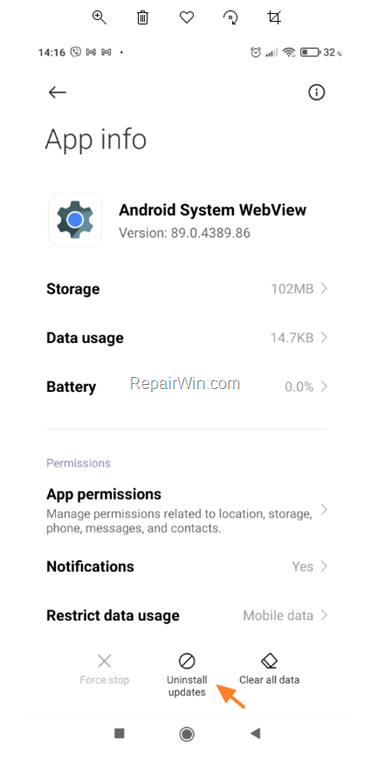
3. Find the Android System WebView app (or Android WebView) in the list and open it.

4. Click Uninstall Updates.
5. Tap OK at the warning message.
6. Restart your device and the problem should be gone.
That's all folks! Which method worked for you? Please leave a comment in the comment section below or even better: like and share this blog post in the social networks to help spread the word about this solution.
Frequently Asked Questions
Why are my Android apps like Gmail and Viber suddenly crashing?
Many Android users experienced app crashes due to a problem with the Android WebView app, particularly affecting Samsung devices. Google has addressed the issue by pushing updates.
What steps can I take to fix crashing apps on my Android device?
You can try the following steps: Open Android Settings, go to Apps, select Show all apps, find Android System WebView, and uninstall updates. Then, restart your device.
Has Google provided a solution for the crashing issue?
Yes, Google quickly identified the issue with the Android WebView app and released updates to resolve the problem.
How do I find the Android System WebView app on my device?
Navigate to Android Settings, tap Manage Apps (or similar options), then select Show all apps. From the list, look for Android System WebView and proceed with the necessary steps to fix the issue.


December 22, 2022 @ 9:35 pm
Thanks for this information. It helped a lot!