
FIX: Error 0x80240023 in Windows 10 Update (Solved)
This tutorial contains step-by-step instructions to resolve the Error 0x80240023 in Windows 10 Update. The update error 80240023 in Windows 10, occurs because Windows could not install the Microsoft Office File Validation Add-in for Office 2007.
Error Code: 0x80240023 – WU_E_EULAS_DECLINED
The license terms for all updates were declined.

How to FIX: Windows 10 Update Error 0x80240023.
Method 1. Install Manually the Microsoft Office File Validation Add-in.
1. Open Windows Explorer and navigate to the following folder:
- C:\Windows\SoftwareDistribution
2. In the search bar type OFV.CAB and press Enter.

3. Copy the OFV.CAB file to your Desktop or to your Downloads location. *
* Note: If two or more OFV.CAB files are found in the results, copy any of them. (It is the same file).
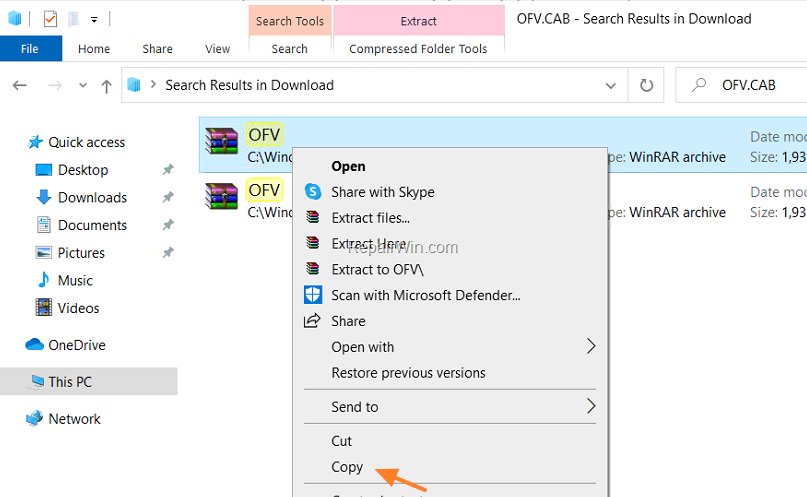
4. Navigate to the location where you copied the OFV.CAB file and extract its contents.

5. Double-click at extracted OFV.msi file to install the Microsoft Office File Validation Add-in for Office 2007 manually.

6. Ask Yes at 'User Account Control' window.

7. When the installation is completed, go to Windows Update and click Retry.
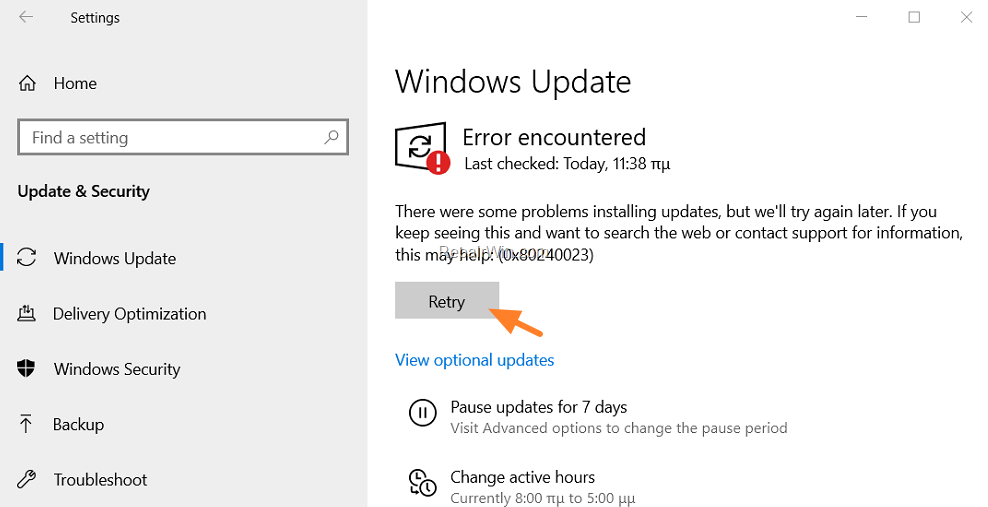
8. That's it! This time Windows will check and install all available updates without displaying the error 0x80240023.
9. If everything is OK, delete the OFV.CAB and the OFV.MSI files from where you copied them (e.g. your Desktop), and continue your job.
Method 2. Prevent the installation of the Microsoft Office Validation Add-in for Office 2007.
1. Download and save the "Show or hide updates" troubleshooter tool on your computer (alternative download link). *
* Source: https://support.microsoft.com/en-us/kb/3073930
2. Run the Show or hide updates tool and select Next at first screen.

3. At the next screen choose Hide Updates.

4. Select the Microsoft Office File Validation Add-in for Office 2007 and click Next.

5. Wait until the troubleshooter applies the appropriate changes on your system and then click Close.
6. Navigate to Windows Update options and click Check for Updates.
That’s all! Did it work for you?
Please leave a comment in the comment section below or even better: like and share this blog post in the social networks to help spread the word about this solution.
Frequently Asked Questions
What is Windows Update Error 0x80240023?
Error 0x80240023, also known as WU_E_EULAS_DECLINED, occurs because Windows could not install the Microsoft Office File Validation Add-in for Office 2007.
How can I manually install the Microsoft Office File Validation Add-in to fix the error?
To manually install the add-in, search for OFV.CAB in C:\Windows\SoftwareDistribution, copy it to your Desktop, extract its contents, and run the OFV.msi file to install the add-in.
What should I do if I want to prevent the installation of the Office Validation Add-in?
To prevent installation, download the 'Show or hide updates' troubleshooter tool, run it, select 'Hide Updates,' choose the Microsoft Office File Validation Add-in for Office 2007, and apply changes.
How can I confirm if the error is resolved after troubleshooting?
After completing the troubleshooting steps, return to Windows Update, click 'Check for Updates,' and ensure that the error 0x80240023 no longer appears.




October 21, 2020 @ 10:18 pm
The error has diappeared for now. I will see if I will be able to get new updates.
Thanks a lot
November 25, 2020 @ 3:44 am
Thank you, this was an easy to follow fix that worked.
January 2, 2021 @ 1:08 pm
super même en anglais j'ai compris …. verry good an cool
HAPPY NEW YEAR :)
January 4, 2021 @ 2:20 pm
Method 1 worked like a charm for me. Thanks for taking the trouble to post this.
January 31, 2021 @ 12:34 pm
Merci beaucoup pour cet article : méthode 1 OK !
April 24, 2021 @ 2:08 pm
Nice. Worked like a charm. Good on you mate.
January 21, 2022 @ 12:42 pm
perfect fix, thanks
January 6, 2023 @ 1:48 am
Hey there,
I am sure it would have worked. However, it did not even show in the tool you suggested. I am reinstalling office 7 again. If that doesn't fix it ill just do a system restore. Its most likely an issue with it not being supported anymore. But, thank you for this tool. I have been a tech for years and never used this tool. Cool thing to have in my toolbox. Thanks again