
How to Hide or Show the Scroll Bars in Windows 10 Start Menu, Settings or Apps.
As you may have noticed, in Windows 10, when you start the Start menu, the Settings app or when working in a Store App, the scroll bar is invisible by default and only appears when you move the cursor to the right side of the open window. This behavior was a little annoying and thankfully Microsoft in the latest Windows 10 1803 feature update(April 2018) added the option to always display the scroll bar in all open windows (for example, in the Start menu in the Settings app, etc.).
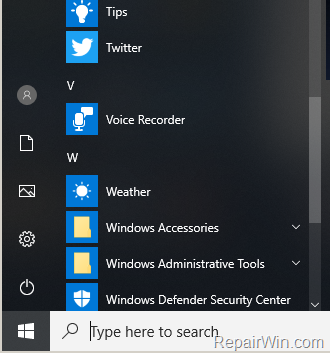
This tutorial contains instructions on how to hide or show always the scrollbars in all open windows and applications, in Windows 10 v1803 (or later).
How to Show or Hide the Scroll Bar in Windows 10 Start Menu, Settings or Apps.
1. From the Start  menu choose Settings
  .
.
2. Open Easy of Access settings.
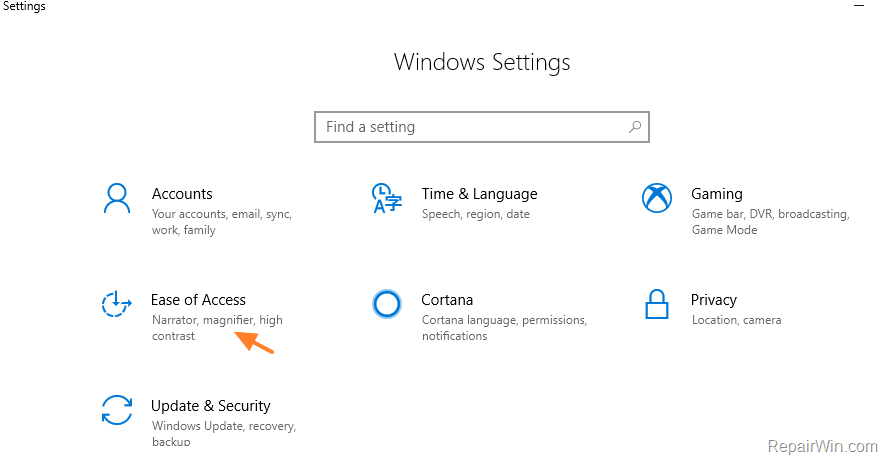
3. Click Display on the left and then "drag" the Automatically hide scroll bars in Windows switch to Off.

That’s all folks! Did it work for you?
Please leave a comment in the comment section below or even better: like and share this blog post in the social networks to help spread the word about this solution.
Frequently Asked Questions
What triggers the appearance of the invisible scroll bar in Windows 10 apps?
The scroll bar becomes visible by default when you move the cursor to the right side of the open window.
Which Windows 10 update added the option to always display the scroll bar?
The option to always display the scroll bar was added in the Windows 10 1803 feature update (April 2018).
How can I ensure scroll bars are always visible in Windows 10?
To make scroll bars always visible, go to Settings, open Ease of Access, click Display, and set the 'Automatically hide scroll bars in Windows' switch to Off.
Is there a way to provide feedback about the scroll bar settings change?
Yes, you can leave a comment in the comment section or share your experience by liking and sharing the blog post on social networks.



