
Event 3036, Search The content source…cannot be accessed (Solved)
A Windows 7 machine becomes un-responsible after a while and the following error is displayed on Event Viewer's Application log:
"Event 3036, Search.
The content source <csc://{S-1-5-21-4218163875-3405771635-1885838064-500}/> cannot be accessed.
Context: Application, SystemIndex Catalog
Details: (HRESULT : 0x80004005) (0x80004005)".
The Event 3036 error, is related to Windows Search service and specifically to Windows Index feature. The "csc" in event details means "Client Side Caching" and is occurred if the indexing of Offline Files is enabled.

How to resolve the "Event 3036, Search 'The content source cannot be accessed' error in Event log.
To fix the Event ID 3036 error(s), first try to repair Windows Desktop Search problems using the Microsoft FixIt tool. If after running the tool you still receive the error, then exclude Offline Files from Indexing and then rebuild the Index. To do that:
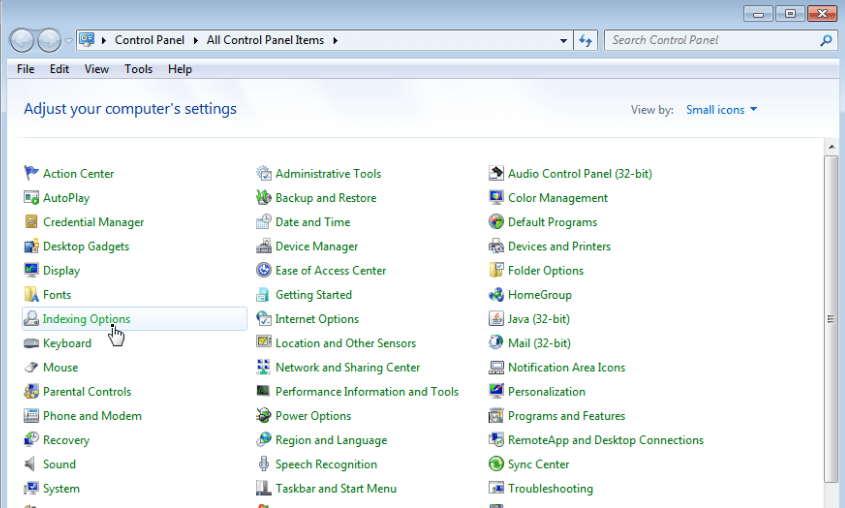
1. Open Windows Control Panel.
2. Double click to open Indexing Options.
 .
.
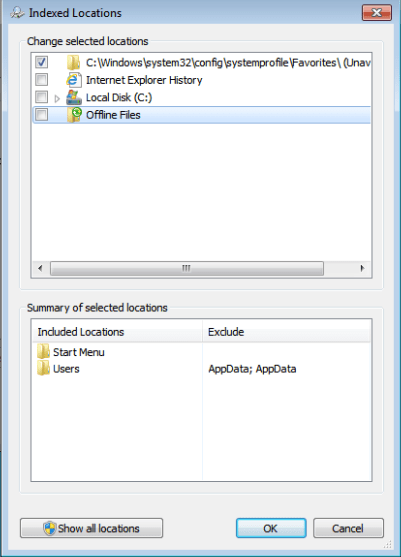
3. Click Modify.

4. Uncheck Offline Files* and press OK.
* Optional uncheck and the Internet Explorer History checkbox.
5. Then click Advanced.
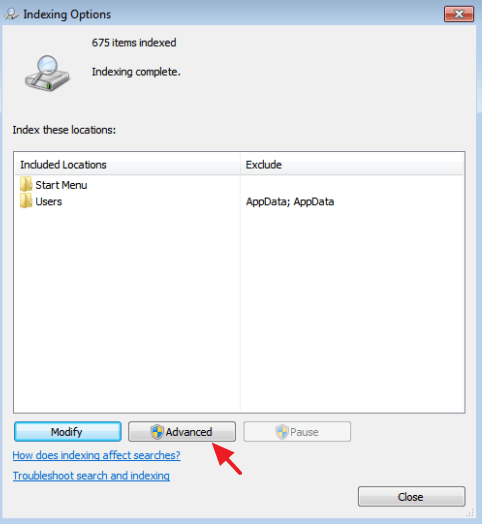
6. At Troubleshooting section, click the Rebuild button.

7. Press OK to rebuild the Index.
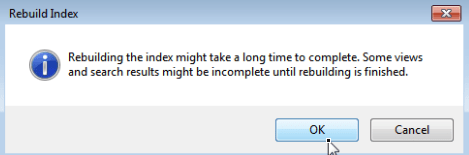
8. Wait until the index rebuilding is completed and then close Indexing options.
9. Restart you computer and check if you still receive the "Event 3036" warning message in Event Log.
That’s all folks! Did it work for you?
Please leave a comment in the comment section below or even better: like and share this blog post in the social networks to help spread the word about this solution.




March 24, 2017 @ 7:53 pm
No. This did not help. Fixit from Microsoft is no longer available.
March 25, 2017 @ 11:29 am
Bill Westrup: Have you tried to rebuild the Index or not?
April 16, 2017 @ 11:27 pm
Bill Westrup – did you rebuild?
May 12, 2017 @ 9:38 pm
Resolved! Thanks! =)
April 13, 2020 @ 2:15 pm
Followed your instructions to rebuild and I no longer have the Event 3036 error. Thanks ! :-)
August 5, 2022 @ 12:57 am
merci cela a resolu mon problème